Your hreflang checker says every hreflang tag is in place, yet your international buyers landing on the wrong storefront (German shoppers visit the the French website) and Search Console keeps indexing the wrong locale. If that sounds familiar, the problem is not your hreflang implementation itself.
On JavaScript-heavy sites, the tool auditing your hreflang tags and the crawler indexing them often read two different versions of the same page. Your hreflang checker reads one version and reports success, but Googlebot reads the other version and finds nothing.
This article explains how that gap forms, why it breaks entire language clusters rather than individual tags, and why AI crawlers turn a delayed problem into a permanent one. By the end, you’ll know exactly why a passing hreflang audit can sit on top of a broken hreflang setup, and what actually closes the gap — all to help you improve your international SEO health.
Key Takeaways: How Hreflang Checker Blind Spots Hurt International SEO
- Hreflang audit tools vs. search engine discrepancy: Hreflang checkers test your site after JavaScript loads, but search engines read your raw website code first—meaning they completely miss your language tags if they are added by JavaScript.
- Misleading audit results: your site can pass every test with zero errors, yet search engines will still send visitors to the wrong country’s page because the testing tools and search bots are reading two different versions of your site.
- Prerender.io for multi-language websites: by using Prerender.io to serve fully loaded, static HTML right away, every search engine and AI bot instantly sees your complete hreflang tags on the very first try.
How Does Hreflang Checker Work?
Hreflang checker validates your international SEO setup by simulating a user’s browser. When you run an audit, the tool requests each URL, lets your server return the page, and executes any client-side JavaScript before scanning the DOM for tags. It verifies that every language variant is declared, return links point back correctly, and canonical URLs align.
Because these tools evaluate the finished, fully rendered page, they report a clean implementation as long as your tags exist once JavaScript finishes running, regardless of when or how those tags were delivered.
Why Does an Hreflang Audit Pass When the Wrong Locales Rank?
You’ve run your site through Screaming Frog, Ahrefs Site Audit, or a browser-based hreflang checker. Every locale page shows its tags, return links, and the report comes back clean, but your traffic tells a different story.
German shoppers keep resolving to the French storefront, the localized pricing you built for that market never reaches it, and Search Console’s Pages report shows the wrong locale indexed as canonical. Both things are true at once, and neither tool is malfunctioning.
The problem is that your hreflang checker loads the page as a browser would. It waits for JavaScript to run, lets your framework inject the hreflang tags, and grades the finished result. Googlebot’s first crawl never waits. It just reads the raw HTML response off your server and moves on.
When your hreflang tags only appear after JavaScript executes, your checker sees a complete implementation, and Googlebot sees nothing at all. That’s a false negative, and it’s the most expensive kind.
Search Console won’t explicitly flag the issue for you either. Google removed the dedicated International Targeting report in September 2022, meaning GSC no longer provides direct hreflang error diagnostics. Instead, the symptom shows up quietly in your GSC Pages report: Google selects the wrong country page as the primary canonical, leaving your intended localized URL unindexed or misrouted.”
So the question isn’t whether your hreflang tags are correct. It’s which version of your page was Google reading when it decided?
How Hreflang Tags Are Served on JavaScript-Rendered Sites
Googlebot indexes a JavaScript site in two passes, and your hreflang tags may only exist in the second.
The first pass, Wave 1, reads the raw HTML your server returns and processes it immediately. Links, meta tags, and hreflang annotations present in that response enter Google’s systems right away.
The second pass, Wave 2, happens later. Google sends the page to its Web Rendering Service, a headless Chromium renderer that executes your JavaScript and captures whatever your framework added to the page. Only then does Google see content and tags that were injected client-side.
Wave 2 is queued, and the queue is shared across the entire web. Google’s own documentation says a page may sit in that queue for a few seconds, but it can take longer. In practice, depending on your site’s size and crawl priority, the gap between Wave 1 and Wave 2 stretches from a few hours to several weeks. During that window, Google is working with a version of your page that may contain no hreflang tags at all.
Your hreflang checker skips that window, evaluating the same output Wave 2 eventually produces. It grades the version Googlebot sees last, while Google’s language targeting begins with the version it sees first.
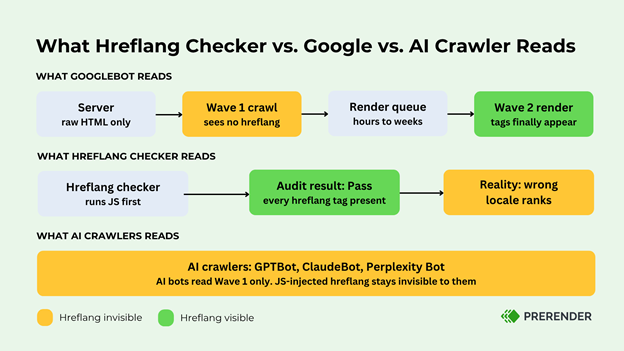
The diagram above traces both readers along the same pipeline. Your audit grades the finish line. Google’s language targeting starts at the gun.
That mismatch explains the contradiction between your clean hreflang audit and your misrouted traffic. Both are reporting honestly on different documents.
3 Ways JavaScript Rendering Breaks Your Hreflang Tags
Hreflang operates in clusters. Every language version must reference every other version, and each must link back. Google treats that bidirectional agreement as a single unit, so if it breaks anywhere, Google can discard signals for the whole group, and your English, German, and Japanese pages stop supporting each other overnight. That’s why one JavaScript-injected page can take down every locale it’s linked to.
Rendering attacks cluster integrity in three ways: the return links, the canonical, and the timing.
1. Missing Return Links: One-Sided Signals in Raw HTML
Google’s hreflang documentation is explicit: if page X links to page Y, page Y must link back to page X, and where that isn’t true across all pages using hreflang — the annotations may be ignored or misinterpreted.
Suppose your US page lists all its alternates in raw HTML, but your German and French pages inject their hreflang tags with JavaScript. On Googlebot’s first pass over those alternate pages, the return links pointing back to the US page aren’t there. Without confirmed return links, Google may treat the relationship as unverified and reject the cluster.
Your hreflang checker won’t catch this, because it reads the rendered version of every page in the cluster. Each page looks complete. The raw HTML tells a different story, and that’s what Wave 1 indexes.
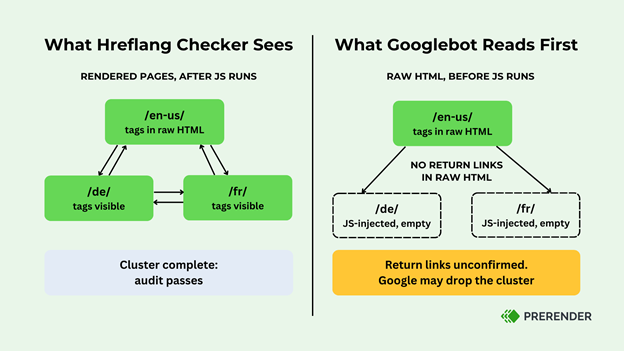
In the comparison above, two missing return links are enough to leave the whole cluster unconfirmed.
2. Canonical Conflicts: Raw HTML vs. JavaScript Signals to Googlebot
Many JavaScript frameworks inject the canonical tag and the hreflang tags together. If the raw HTML ships with a default canonical, or none at all, and JavaScript later rewrites it, Google receives two conflicting canonical signals for the same URL at two different times.
Hreflang depends on canonicals. Google requires each annotation to point to the canonical version of its locale page, and a canonical pointing to a different language version causes Google to disregard the hreflang annotations on non-canonical pages.
When the canonical itself is ambiguous, Google can’t resolve which URLs belong in the cluster, and ignoring the hreflang signals is the safest option from its side. One rendering inconsistency compounds into a second, and together they take down the group.
3. Render Timing Gaps: Why Locale Pages Fail to Index at the Same Time
Render priority isn’t spread evenly across your site. High-traffic pages tend to get rendered sooner. Deep catalog pages, long-tail product variants, and low-priority locale pages wait longer in the render queue.
On a multi-language ecommerce site with 300,000 to 1 million+ URLs, that means your hreflang visibility is never in a single consistent state. At any point in the crawl cycle, some pages in a cluster have rendered and show their tags while their siblings haven’t. Google keeps encountering partially confirmed clusters, and partial confirmation often reads as failure.
React sites show this clearly. If hreflang tags are added during hydration, each page’s tags surface only when that page clears the render queue. Two pages in the same cluster, deployed from identical code, can show Google different hreflang states for weeks. The inconsistency is structural, and it persists no matter how many times your audit passes.
Why AI Crawlers (GPTBot, Perplexity) Ignore JavaScript Hreflang Tags
Googlebot does eventually run Wave 2 and pick up your JavaScript-injected tags, even if the cluster suffers while it waits. Every failure so far has been a delay.
AI crawlers, however, remove the “eventually.” GPTBot, ClaudeBot, PerplexityBot, and the other bots feeding AI search surfaces do not execute JavaScript at all. They read the raw HTML response and stop there. There is no second wave, no render queue, and no later pass that catches up. Google’s own JavaScript SEO documentation concedes the point from the other side, recommending pre-rendering partly because not all bots can run JavaScript.
For a multi-market business, the consequence is direct. If your hreflang tags are injected client-side, every AI-driven search surface is working with zero language signal from your site. When an AI assistant answers a shopping query from a user in Germany, it has no machine-readable way to know your German-language catalog exists, because the page it fetched never declared any alternatives.
The x-default tag shows how the checker deepens that false confidence. Checkers evaluate the rendered page, where x-default is present, and report it as fine.
On a client-side single-page application, an x-default that only appears after JavaScript runs may never reach Googlebot’s initial index, and will never reach an AI crawler at all. The checker validates a tag that a growing share of crawlers cannot see.
For Googlebot, JavaScript-injected hreflang is a reliability problem you can wait out. For AI crawlers, waiting changes nothing because the tag was never in the document they read.
Prerender.io Solves Hreflang Issues for Multi-Language Websites
The fix to hreflang issues is to make sure there’s only one version of your page to read, and Prerender.io can help with that.
Prerender.io does this by rendering your JavaScript pages in advance and serving crawlers a static HTML snapshot with everything already in place, hreflang tags included. When Googlebot requests a page, it receives a complete document on the first pass, so the Wave 1 and Wave 2 distinction stops mattering. There’s nothing left for rendering to add.
One change closes all four gaps. Return links and canonicals ship together in the raw HTML of every locale page, so clusters confirm on first contact instead of waiting for a render that arrives page by page. Your audit starts grading the document Google indexes, and because GPTBot, ClaudeBot, and PerplexityBot read raw HTML, your language signal reaches AI search for the first time.
Prerender.io makes the hreflang tags you’ve already implemented visible to every crawler — pair it with your existing hreflang checker to catch misconfigurations before they ship. It makes the hreflang tags you’ve already implemented exist in the document every crawler receives, the one thing no hreflang checker can do for you. If your locale pages are rendering client-side, that gap is already costing you traffic across every market you’ve localized for.
Start a free trial with Prerender and see what Googlebot sees on the first request.
Final Thoughts on Hreflang Checker Blind Spots
Your hreflang checker isn’t broken. It answers a question you didn’t mean to ask: does hreflang exist once the page has finished loading? What you needed to know was whether the tags exist in the document that the document crawlers receive.
On a server-rendered site, those questions have the same answer, which is why the checker earned your trust. On a JavaScript site, they come apart, and every hour your tags wait in the render queue is an hour Google routes your German shoppers by guesswork.
Check it yourself in two minutes. Disable JavaScript, view the page source of one locale page, and search it for hreflang. If the tags aren’t there, no checker result is worth acting on until they are.
FAQs About Hreflang Checker for Multiple-Language Websites
Why Does My Hreflang Checker Show No Errors While the Wrong Locale Still Ranks?
My hreflang checker shows no errors while Search Console indexes the wrong country page because your checker evaluates the rendered page after JavaScript runs, but Googlebot’s initial pass only reads raw HTML. Client-side tags are invisible on that first crawl, and without GSC’s deprecated International Targeting report, Googlebot silently defaults to routing users without hreflang signals—indexing the wrong country page while your audit tool passes.
If My Hreflang Cluster Looks Correct in My Checker Tool, Can Google Still Reject It?
If your hreflang cluster looks correct in your checker tool, Google can still reject it because your checker reads every page fully rendered, making the whole cluster look confirmed. However, if any locale page serves its return links via JavaScript, those links are absent from the raw HTML Google indexes first. Unconfirmed return links, or a canonical that conflicts with the injected tags, can make Google discard signals for the entire cluster while your audit still passes.
Do AI Crawlers Like ChatGPT’s and Perplexity’s Bots Support Hreflang at All?
AI crawlers like ChatGPT’s and Perplexity’s bots support hreflang only if the tags exist in the raw HTML response. GPTBot, ClaudeBot, and PerplexityBot do not execute JavaScript, so any hreflang tag added client-side is permanently invisible to them. On a JavaScript site without pre-rendering, AI search surfaces receive no language signal from your pages.
How Does Prerender.io Handle Localized Pricing, Currency, and Stock Variations Across Different Markets?
Prerender.io handles localized pricing, currency, and stock variations across different markets by rendering and caching each locale URL as its own document, so your German page is snapshotted with its German pricing, currency, and availability, and your Japanese page with its own. Crawlers requesting each URL receive the fully localized version of that page, with recaching keeping time-sensitive details like stock levels current.
Does Using Prerender.io for Hreflang Tags Count as Cloaking?
Using Prerender.io for hreflang tags does not count as cloaking because cloaking means showing crawlers meaningfully different content than users see. Prerender.io serves crawlers the same content your users get after JavaScript runs, delivered as static HTML. Google’s own documentation states that it generally doesn’t treat dynamic rendering as cloaking as long as the crawler and the user receive similar content, which is how Prerender.io works.