Enterprises running JavaScript-heavy applications routinely invest six figures annually in premium CDN infrastructure. That investment is worthwhile. CDNs solve real problems, but they cannot solve the one that’s killing your organic performance.
CDNs deliver content fast, but they cannot execute JavaScript. That single limitation means every search engine bot, AI crawler, and social platform crawler that visits your site sees an empty HTML shell, regardless of how fast your CDN delivers it. The content that should be indexed exists only after JavaScript runs, but most crawlers never get there.
Prerender.io exists at a different layer of your infrastructure to fix exactly this. The CDN makes your site fast; Prerender.io makes your site readable to every crawler that matters.
This article breaks down why these two layers operate independently, what each one does and where each one stops, and why enterprise SEO strategies require both.
TL;DR: CDNs vs. Prerender.io for Enterprise SEO
CDNs (like Cloudflare, Akamai, Fastly, AWS CloudFront) cache and deliver your site’s files faster by routing requests through globally distributed servers. They reduce latency, protect origin servers during traffic spikes, and improve Core Web Vitals scores.
CDNs cannot execute JavaScript. Every crawler that visits a JavaScript-rendered page sees an empty HTML shell, regardless of how fast the CDN serves it.
Prerender.io fills that gap by using headless Chrome to fully render each page, then serving the resulting HTML snapshot to crawlers. Human visitors still receive the normal JavaScript experience.
Without a rendering layer, your site is invisible to:
- Google’s rendering queue backlogs.
- All major AI crawlers (GPTBot, ClaudeBot, PerplexityBot).
- Social platform preview bots.
- Bing, Yandex, and Baidu, which do not execute JavaScript.
Both layers are required; neither replaces the other.
Four Ways the JavaScript Indexing Problem Shows Up at Enterprise Scale
Enterprise teams invest in CDNs for legitimate reasons: delivery speed, origin protection, and Core Web Vitals. Those problems are solved. The deeper problem driving enterprise SEO anxiety today is different, because the JavaScript indexing issues CDNs cannot solve show up as:
- Crawlers failing to access dynamically generated content.
- Pages missing from search indexes despite being live and accessible to users.
- Social shares returning broken or generic previews instead of rich cards.
- International markets not indexing pages correctly due to JavaScript-dependent hreflang and canonical signals.
These are rendering problems. CDN infrastructure is not equipped to address them. Here’s how each one compounds at enterprise scale.
Problem 1: Google’s Two-Step Rendering Pipeline Creates Index Lag
Google processes JavaScript pages in two distinct phases, and the gap between them is where enterprise risk compounds.
In the first phase, Googlebot fetches a URL and downloads the HTML served by the CDN. For JavaScript applications, that initial HTML is nearly empty. No content is indexed at this stage.
In the second phase, Google’s Web Rendering Service (WRS) must execute the JavaScript rendering in a separate pass, often hours or days after the initial crawl. Because rendering is computationally expensive, JavaScript pages wait in this second queue on top of the standard crawl queue that all pages face.
Analysis by Vercel and MERJ across 37,000 pages also found that the slowest 1% took approximately 18 hours to render after crawl. For a site managing 50,000 URLs, that 1% represents 500 pages sitting unprocessed at any given moment.
When 2,000 pages are updated overnight for a product launch, pages that clear the rendering queue quickly reflect the update. Pages still waiting in queue serve stale or empty content to Google, while your CDN cache and application servers are fully current.
Problem 2: AI Crawlers Driving Significant Traffic Do Not Execute JavaScript
GPTBot makes 569 million page requests per month on Vercel’s network alone. Anthropic’s ClaudeBot makes 370 million. PerplexityBot grew 157,490% year over year, according to Cloudflare’s data. Combined, AI crawler traffic already represents approximately 28% of Googlebot’s total monthly request volume.
But none of them can execute JavaScript. A study analyzing over half a billion bot visits confirmed that no major AI crawler executes JavaScript. They fetch raw HTML and extract whatever text is immediately present. If your content only exists after JavaScript runs, it isn’t there.
Perplexity, ChatGPT Search, and Claude.ai pull citation content from what their crawlers can actually read. AI citation visibility matters most on consideration-stage queries (product comparisons, pricing, technical specifications), where AI answers are increasingly displacing traditional search results. Enterprises not visible to AI crawlers now are building a disadvantage that will compound as that traffic grows.
Read: Understanding Web Crawlers: Traditional vs. OpenAI’s Bots
Problem 3: Social Platform Crawlers Return Broken Previews—and Skew Your Attribution
Here’s the problem: most teams don’t catch that paid social posts render preview cards correctly, but organic shares don’t.
When anyone shares a URL from a JavaScript-rendered page on LinkedIn, Twitter/X, Facebook, or Slack, the platform’s crawler reads raw HTML. For applications where Open Graph tags only appear in the DOM after JavaScript runs, the crawler finds nothing and falls back to a bare URL—no image, no title, no description.
Paid posts often render preview cards correctly because platforms process paid placements through different pipelines. So organic shares fail silently, attribution analysis reads the gap as paid outperforming organic on content quality grounds, and budget shifts accordingly. The misallocation persists as long as the rendering failure does.
LinkedIn’s own data shows posts with images generate twice the comment rate of those without. Every organic share from a JavaScript-rendered page defaults to a bare URL, and for an enterprise content operation distributing hundreds of assets monthly, that engagement gap compounds across everything.
Marketing operations teams typically paper over this with manual workarounds: hardcoded Open Graph databases, pre-campaign URL submissions to platform debuggers, and manual preview checks before distribution. These don’t scale. Every workaround is a headcount tax on a problem infrastructure should solve.
Related: How Social Media and Open Graph Tags Impact LLM Training Data
Problem 4: Outside Google, JavaScript-Only Content is Effectively Invisible
For enterprises with international audiences, the rendering problem is significantly worse.
Bing has publicly acknowledged that rendering JavaScript at scale remains operationally difficult. Yandex does not execute JavaScript in its crawler at all. Baidu’s JavaScript support is limited, inconsistent, and changes without notice.
These limitations directly affect international SEO because hreflang tags, canonical tags, and language-specific metadata are commonly implemented via JavaScript in modern frameworks. If those signals only exist in JavaScript output, every search engine that can’t execute JavaScript misses the international taxonomy entirely — potentially indexing wrong language versions in wrong markets, or generating duplicate content signals that suppress global rankings.
For enterprises operating internationally, this doesn’t surface as a rendering error in standard monitoring. It shows up as organic traffic from non-Google markets declining without an obvious cause, by which point the gap has been compounding for months.
How Popken Fashion Group Fixed Their International Indexing Gap
Popken Fashion Group, Europe’s largest plus-sized retailer, manages SEO across 32 domains in 16 countries. When an internal issue forced them to briefly turn off Prerender.io, rankings dropped almost immediately across markets.
When it was re-enabled, visibility began to recover within a week. In one market alone, approximately 15,000 additional pages were indexed after reactivation—with 50% cost savings over alternative solutions and no engineering lift required.
With the failure modes established, the next step is understanding exactly what each infrastructure layer does and where each one stops.
CDN vs Prerendering: What Each Layer Actually Does
The CDNs vs. Prerender.io distinction comes down to delivery vs. rendering, and which layer of your web infrastructure each operates at. Understanding what each one does (and where it stops) is the foundation for everything else in this article.
What a CDN Does: The Delivery Layer
A content delivery network is a globally distributed caching and routing system. CDNs like Cloudflare, Akamai, Fastly, and AWS CloudFront deliver your site’s files faster by caching copies across hundreds of global locations. When a visitor requests a page, the nearest server responds instead of your origin server.
For enterprise operations, this solves a specific set of problems:
- Latency reduction: for a user in Singapore requesting content from a US-based origin, a CDN can reduce round-trip time from 200ms to under 20ms.
- Origin protection: a well-configured CDN absorbs 80–90% of all requests at the edge, preventing origin saturation during product launches or traffic spikes.
- Core Web Vitals: asset compression, HTTP/2 and HTTP/3 multiplexing, and geographically proximate delivery directly improve LCP, FID, and CLS scores.
- Security: TLS termination and DDoS mitigation at the network layer reduce cryptographic overhead on application servers.
For user experience and performance, CDNs are essential. But they serve files, not rendered pages. For a JavaScript application, those files include an HTML skeleton, typically a near-empty <div id="root"></div>
At scale, an unrendered site is an invisible site. That is the boundary of what a CDN can deliver, but Prerender.io starts exactly where the CDN stops.
What Prerender.io Does: The Rendering Layer
Prerender.io addresses whether the content JavaScript generates is accessible to crawlers that cannot execute it.
With Prerender.io, a fleet of headless Chrome browser instances loads each page in a full Chrome environment, executes all JavaScript, waits for API calls to resolve, and captures the fully built HTML output through HTML snapshot generation.
That snapshot contains everything a crawler needs: fully rendered text, canonical tags, structured data markup, Open Graph tags, hreflang attributes, and all other metadata generated dynamically by JavaScript. The JavaScript code is stripped from the snapshot because crawlers need the output, not the instructions.
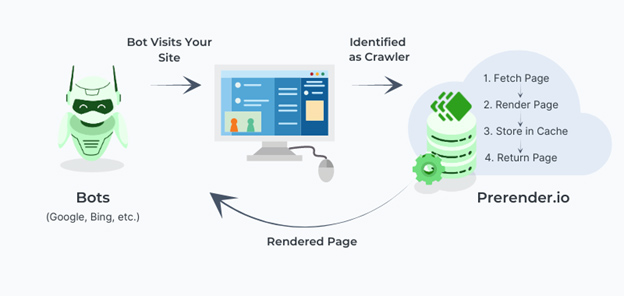
Routing logic at the CDN or server layer inspects each request’s user-agent string and directs traffic accordingly. Bot requests are served the pre-built HTML snapshot. Human visitors receive the JavaScript application through the CDN with full interactivity intact. Both paths run in parallel with no user-facing impact.
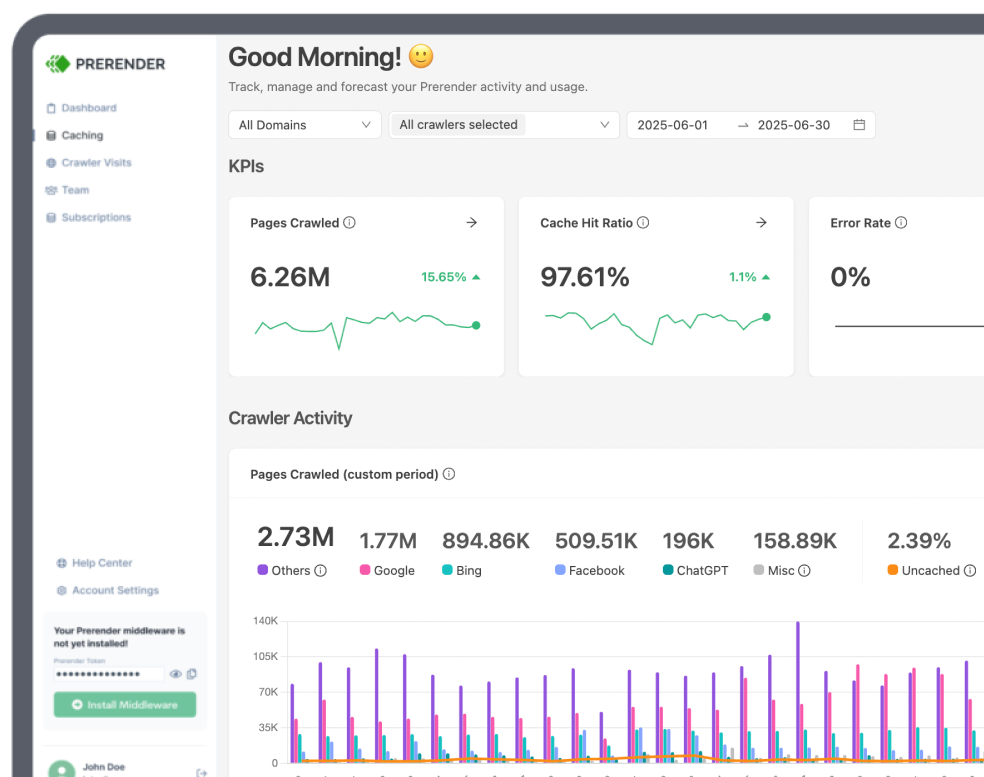
For cached pages, Prerender.io delivers HTML snapshots in 30–50 milliseconds — faster than most web servers respond. Rendering happens once and is cached, so application servers are never involved in crawler responses. Cache freshness is configurable from 6 hours to 30 days, with different refresh schedules per page type. An e-commerce site might refresh product page snapshots every 12 hours to keep pricing and availability current, while refreshing blog content weekly.
How CDN and Prerender.io Work Together: Dynamic Rendering
The system connecting these layers is called dynamic rendering, which Google introduced in 2018 as an official solution for JavaScript-heavy sites.
When a request arrives at your CDN, routing logic reads the user-agent string to determine whether the requester is a human or a bot. Bot requests are routed to Prerender.io, which returns a pre-built HTML snapshot. Human requests follow the normal path through the CDN to the JavaScript application.
Both paths run simultaneously without interfering with each other. Akamai itself published a blog post explaining how Prerender.io solves the JavaScript indexing gap left by CDNs—when your CDN vendor publicly documents the need for a prerendering layer on top of their own infrastructure, the architectural boundary between these two technologies is settled.
Related: Prerender.io’s dedicated integration guides for Cloudflare, Fastly, and Akamai.
CDN vs. Prerender.io: Side-by-Side Comparison
| Feature | CDN | Prerender.io |
|---|---|---|
| Primary function | File delivery and caching | JavaScript rendering for crawlers |
| Executes JavaScript | No | Yes (headless Chrome) |
| Improves Core Web Vitals | Yes | No direct impact |
| Covers Google | Delivery only | Full rendered HTML |
| Covers AI crawlers | Delivery only | Full rendered HTML |
| Covers Bing, Yandex, Baidu | Delivery only | Full rendered HTML |
| Covers social preview bots | Delivery only | Full rendered HTML |
| Deployment complexity | Moderate | Hours, no code changes |
| Works without the other | For users, yes. For crawlers, no. | Requires CDN for delivery |
Why Not Just Use Server-Side Rendering?
Google recommends server-side rendering (SSR) as a solution to JavaScript indexing problems. The recommendation is technically sound. The implementation reality is different.
Full SSR migration costs $120,000 or more upfront, plus ongoing maintenance requiring specialized engineering. It demands changes across the entire application: server configuration, build processes, data management between server and browser, and often a complete framework migration. The timeline typically spans 3–6 months for large codebases.
SSR also addresses primarily one crawler: Google. Bing, Yandex, social media bots, and AI crawlers are not guaranteed to properly receive server-rendered pages, especially when CDN caching settings interfere with delivery.
Prerender.io deploys in hours without code changes. Because it connects at the CDN level, a single rendering layer covers the entire ecosystem of JavaScript-blind bots: Google, Bing, Yandex, Baidu, every major social platform, and every AI crawler driving traffic today.
For most enterprise teams, SSR is an architectural aspiration. Prerender.io is the infrastructure decision you can make this week.
Prerender.io: The Architecture Running at Enterprises Like Walmart, Spotify, and Domino’s
The longer you wait to add a rendering layer, the more ground you’re conceding to competitors already visible in AI-generated answers, social previews, and international search indexes. Your CDN is doing its job. The question is whether the content it’s delivering at speed is actually reaching the crawlers that determine your organic revenue.
For enterprises managing thousands of dynamic URLs (where organic search, social sharing, and AI-driven discoverability directly impact pipeline), every SEO investment you’ve made in content, technical optimization, link building, and paid amplification depends on one thing: crawlers being able to read the pages.
Prerender.io is the infrastructure layer that makes sure they can. Get started today and see what crawlers are actually seeing on your site today.
FAQs About JavaScript SEO, CDNs, and Prerendering
1. Why is My Site Fast but Not Ranking in Google or LLMs?
Speed and visibility are solved at different infrastructure layers. If your site loads in under two seconds but pages are missing from Google’s index, the problem is rendering, not delivery. For JavaScript applications, your CDN is serving crawlers an empty HTML shell. The content that should be indexed only exists after JavaScript executes, which most crawlers cannot do. A prerendering layer like Prerender.io solves this by serving crawlers a fully rendered HTML snapshot instead.
2. Do CDNs Help With SEO Indexing?
CDNs improve delivery speed and Core Web Vitals scores, both of which are Google ranking signals. However, CDNs cannot solve JavaScript indexing issues because they do not execute code. A CDN delivers files to crawlers at speed; whether those files contain readable content is outside the CDN’s scope entirely. For JavaScript-rendered sites, you need a separate rendering layer alongside your CDN.
3. What is the Difference Between Server-Side Rendering and Prerendering?
Server-side rendering (SSR) rebuilds your application architecture so pages are generated on the server before being sent to the browser. For enterprise codebases, SSR migration is a significant engineering undertaking that typically spans multiple months and costs $120,000 or more. Prerendering captures fully rendered HTML snapshots of your existing JavaScript pages and serves them to crawlers on request, without touching application code. SSR is an architectural decision. Prerendering is an infrastructure layer added on top of what you already have, and it can be deployed in hours.
4. Which Search Engines and Crawlers Does Prerender.io Cover?
Prerender.io covers every major crawler: Google, Bing, Yandex, Baidu, all major social platform preview bots (LinkedIn, Twitter/X, Facebook, Slack), and all major AI crawlers, including GPTBot, ClaudeBot, and PerplexityBot. Any requester identified as a bot via the user-agent string receives the pre-rendered HTML snapshot, solving JavaScript indexing issues across the full crawler ecosystem, not just Google.
5. Why Are My Pages Invisible to AI Crawlers Like GPTBot and PerplexityBot?
AI crawlers do not execute JavaScript. They fetch raw HTML and extract whatever text is immediately present. For JavaScript-rendered applications, that means AI crawlers see the same empty HTML shell your CDN serves: no content, no metadata, nothing to index or cite.