A solid Cloudflare integration is the foundation for resolving Lovable SEO issues. But when the Lovable–Cloudflare integration layer isn’t configured correctly, problems surface quickly: your pages load for users but not for crawlers, or your metadata exists but doesn’t get picked up. Ultimately, your content visibility becomes incredibly inconsistent.
For some teams, connecting Lovable to Cloudflare is straightforward. But for others, it can be a debugging session involving redirect loops, blocked crawlers, caching conflicts, and subtle Cloudflare bot rendering issues that aren’t immediately obvious.
This guide breaks down the most common Lovable and Cloudflare integration failures, and shows you exactly how to fix each one.
TL;DR of Common Lovable and Cloudflare Integration Challenges and How to Fix Them
If your Lovable site isn’t indexing, search engine crawlers aren’t seeing content, or you’re getting Cloudflare errors like 1000 or 502, the issue is usually in the Cloudflare integration layer—not necessarily with Lovable itself.
In most cases, the Lovable and Cloudflare troubleshooting comes down to:
- Removing the custom domain from Lovable and letting Cloudflare fully control routing
- Using the Lovable-specific Cloudflare Worker (not the standard version)
- Ensuring DNS records are proxied (orange cloud) and not using A records
- Setting SSL to Full (Strict)
- Disabling Rocket Loader, Signed Exchanges, and reviewing Bot Fight Mode
- Confirming bot requests return rendered HTML (look for
x-prerender-request-id) - Separating bot and human cache behavior
If you’re using Prerender.io for your Lovable app, most “not working” reports also trace back to misconfigured Workers, blocked bots, caching conflicts, or DNS/SSL mistakes in Cloudflare.
When the integration is correct, bot traffic is intercepted at the edge, routed properly, and receives fully rendered HTML, while human users continue to load the SPA normally.
Why Lovable Apps Aren’t SEO-Friendly by Default
Lovable is an AI-powered software builder that generates web applications from natural language prompts. These apps are typically client-side rendered, which means that when Googlebot or an AI crawler visits your Lovable website, it only sees an empty website while JavaScript fills in content and metadata after load.
Here’s what search engine crawlers receive when they make requests on a Lovable site:
<!DOCTYPE html>
<html>
<head><title>My Site</title></head>
<body>
  <div id="root"></div>
  <script src="/assets/index-abc123.js"></script>
</body>
</html>
Every route returns this identical empty web page shell without the content, meta tags, or internal links. This is the core problem with client-side rendering (CSR), and it creates specific problems that directly affect content visibility and traffic.
- Crawl delays. Google uses a two-phase process: it crawls raw HTML first, then queues JavaScript-heavy pages for a separate rendering pass. That queue adds days to weeks of delay, and execution is not guaranteed, causing pages to appear inconsistently in search results.
- Invisible meta tags. Per-page titles, descriptions, canonical URLs, and JSON-LD structured data set via
react-helmet-asyncare all JavaScript-rendered. Crawlers that skip JS execution never see them, which means your rich snippets and structured data produce no SEO value. - Broken social link previews. Facebook, LinkedIn, Twitter/X, Slack, Discord, and WhatsApp all fetch pages without executing JavaScript. They receive the empty shell and generate blank or generic link previews. Broken social link previews directly reduce click-through rates on every shared link.
- No internal link discovery. React Router links and programmatic navigation calls are invisible in raw HTML. Search engines cannot discover linked pages even when those pages exist in a sitemap.
- Wasted crawl budget. Crawlers download heavy JavaScript bundles for every URL and encounter the same empty shell across all routes, directly harming crawlability and indexability across your entire site.
How to Check Whether Your Lovable Website Is Having SEO Issues
Lovable’s own SEO and AEO guidance documents the practical limitations of client-side rendering (CSR), and notes that metadata does not automatically update across routes unless you implement route-specific metadata management.
To confirm whether your site has common Lovable SEO problems, run:
curl -i -A "Mozilla/5.0 (compatible; Googlebot/2.1; +http://www.google.com/bot.html)" \
  -H "Accept: text/html" https://your-lovable-site.com
If the response body contains only <div id="root"></div>
| Feature | Visible to crawlers without Prerender? |
|---|---|
| robots.txt | Yes |
| sitemap.xml | Yes |
| Per-page meta tags | No |
| Open Graph / social previews | No |
| JSON-LD structured data | No |
| Page content and headings | No |
| Internal links | No |
| Canonical URLs | No |
To fix Lovable SEO issues, use Prerender.io to pre-render your Lovable app and deliver fully rendered content to crawlers. This ensures 100% visibility of your website’s content. We’ve explained how Prerender.io makes your Lovable website SEO-friendly here.
That said, you may run into challenges when integrating Prerender.io with Cloudflare and Lovable. Let’s take a closer look at how the integration works—and the most common blockers you might encounter.
How the Lovable, Cloudflare, and Prerender.io Integration Works
A Cloudflare Worker sits between your visitors and your Lovable app, solving the Lovable SEO issues caused by JavaScript rendering. Every request passes through it, and it routes traffic in one of two directions based on the User-Agent header.
How Cloudflare Worker Identifies Bots
The Cloudflare Worker checks incoming User-Agent strings against a BOT_AGENTS list covering:
- Search engines: Googlebot, Bingbot, Yandexbot, Applebot
- Social crawlers: facebookexternalhit, Twitterbot, LinkedInBot, Slackbot, Discordbot
- SEO tools: Semrushbot, Ahrefsbot, Screaming Frog
- AI bots: GPTBot, ClaudeBot, PerplexityBot, Anthropic-AI
When a match is found, the Cloudflare Worker fetches https://service.prerender.io/https://your-domain.com/path using your X-Prerender-Token and returns the rendered HTML. An X-Prerender header check prevents an infinite loop, since Prerender.io itself needs to fetch your page in order to render it.
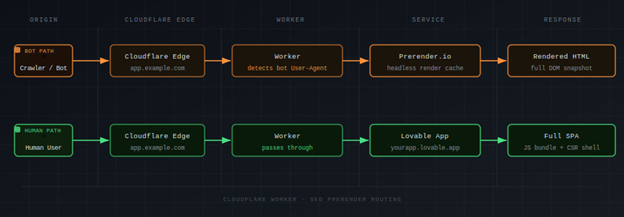
As the diagram shows, bot traffic routes through Prerender.io and returns rendered HTML, while human traffic passes directly to the Lovable app. Neither group is aware of the other’s path.
Why Lovable Requires a Different Cloudflare Worker
Prerender.io offers two Worker variants: a standard Cloudflare Worker and a Lovable-specific one. The bot-detection logic is identical in both, but the difference lies in how each handles human traffic.
The standard Worker calls fetch(request) to pass human visitors through to an existing origin server. Lovable-hosted sites do not have an accessible origin server in that sense. Instead, the Worker attaches via Custom Domains, which makes the Worker itself the origin. Human traffic must be explicitly proxied to yourapp.lovable.app inside the Worker code.
Prerender.io provides a separate gist for this (github.com/Lasalot/4e5b294438d5404a5fb4aa4f63313dfb). It requires two changes: your Lovable upstream URL and your domain. Deploying the standard Worker gist on a Lovable setup silently breaks the site for human visitors. Bots appear to work fine, which makes the problem easy to miss.
Learn more about how to connect Prerender.io to your Lovable websites through Cloudflare in these integration guides:
Prerender.io Lovable Integration Guide
Prerender.io Cloudflare Integration Guide (v2)
Common Lovable and Cloudflare Integration Issues
The failure points below cover the majority of Lovable and Cloudflare integration issues reported around this stack. If Cloudflare prerender not working describes your situation, one of these sections will identify exactly why. Most of these are Cloudflare bot rendering issues, cases where Cloudflare’s own features interfere with Prerender’s ability to intercept and serve bot traffic correctly.
1. Redirect Loops
Cause:
The custom domain is configured inside Lovable while also being handled by the Cloudflare Worker. Lovable forces its own redirects, the Worker adds another routing layer, and the request loops indefinitely. If a domain is marked primary inside Lovable, other domains redirect to it, which interacts poorly with proxy-based setups.
Fix:
Remove the custom domain from the Lovable project’s Domains settings. Only yourapp.lovable.app should remain configured in Lovable. The Cloudflare Worker Custom Domain handles the public-facing domain entirely.
This domain conflict is the single most impactful prerequisite in the entire setup. Skip it and nothing else works correctly.
Verify:
curl -I -L https://app.example.com/The chain should resolve cleanly to a 200. If you see repeated 301 or 302 responses cycling without resolution, the domain is still connected inside Lovable.
2. AI Crawlers Not Indexing or Citing Your Lovable Site
Cause:
Cloudflare blocks AI training crawlers by default on newly added domains. Without explicitly enabling access, AI crawlers like GPTBot and PerplexityBot cannot reach your content regardless of your Prerender configuration.
Fix:
Go to Account Home, select your domain, navigate to Overview, and select “Control AI crawlers.” Review which crawlers are blocked and enable access for the ones you want to allow. Confirm the relevant AI bot User-Agents (GPTBot, ClaudeBot, PerplexityBot, Anthropic-AI) are also present in your Worker’s BOT_AGENTS list so they route through Prerender and receive rendered HTML.
Verify:
Go to Security > Events in your Cloudflare dashboard, then filter for AI crawler User-Agents such as GPTBot or ClaudeBot. If you see challenge or block events against those crawlers, they are being stopped before the Worker runs. No events means they are passing through as intended.
3. Social Link Previews From Lovable Apps Are Generic or Wrong
Cause:
Facebook, X, and LinkedIn preview crawlers do not execute JavaScript. They only see the initial HTML returned by the server. If Open Graph and Twitter Card meta tags are not present in the initial HTML for each route, previews fall back to generic defaults.
Fix:
Ensure Open Graph and Twitter Card tags are present in the initial HTML for every route, not injected by JavaScript after load. Confirm the social crawler User-Agents are in your Worker bot list. The Prerender Lovable Worker template includes facebookexternalhit, twitterbot, and linkedinbot by default.
Learn more about common social link preview problems and how to troubleshoot them.
Verify:
Run the URL through Facebook Sharing Debugger, X Card Validator, and LinkedIn Post Inspector. Each tool shows exactly what its crawler found when it fetched the page, so you can see directly whether your Open Graph tags are present and rendering correctly.
4. Cloudflare Error 1014 and Error 1000
Cause:
Lovable runs on Cloudflare’s infrastructure. When your domain is also on Cloudflare and uses a CNAME pointing to yourapp.lovable.app, cross-account CNAME resolution through Cloudflare’s proxy triggers these errors. Cloudflare defines Error 1014 as “CNAME Cross-User Banned” and Error 1000 as “DNS points to prohibited IP.”
Fix:
Use Workers Custom Domains rather than standard DNS route-based Workers. In your Cloudflare dashboard, go to Workers & Pages, open your Worker, navigate to Settings, and add your public domain under Custom Domains. Cloudflare provisions the DNS automatically. Do not manually create a CNAME or A record pointing to yourapp.lovable.app alongside this, as that reintroduces the conflict.
If your setup requires traditional DNS, use a CNAME record rather than an A record. An A record pointing to a Cloudflare IP is a documented trigger for Error 1000, and community members running this integration consistently identify A records as the source of DNS failures.
Regardless of DNS approach, audit your Worker for forwarded IP headers. Before fetching the Lovable upstream, delete CF-Connecting-IP and any duplicated X-Forwarded-For headers. Passing these through a Cloudflare-proxied request is a documented cause of Error 1000. The Prerender Lovable Worker template handles this by default. If you are using a custom Worker, add the deletions explicitly.
Verify:
Run a bot User-Agent curl request and look at the response. If you are still seeing 1000 or 1014 errors, a conflicting DNS record is still in place. If you see 525 or 526, the SSL mode needs attention. A clean 200 with no error codes means the DNS conflict is resolved.
5. Cloudflare Worker Not Intercepting Bot Traffic
Cause:
Route patterns are misconfigured, the Worker is deployed to the wrong Cloudflare zone, or the failure mode is set to fail-closed, returning a 500 instead of falling through to the origin. A missing or misconfigured PRERENDER_TOKEN secret will also silently break bot routing.
Fix:
Confirm route patterns cover all URL variations for your domain:
| Website type | Correct route pattern |
|---|---|
| example.com | example.com/* |
| www.example.com | www.example.com/* |
| Both www and non-www | *example.com/* |
| Any subdomain | *.example.com/* |
Set the Worker failure mode to “Fail open (proceed)” so errors degrade gracefully rather than taking the site down.
Confirm the Worker has PRERENDER_TOKEN set as a secret and that the bot path sends X-Prerender-Token. The token is mandatory and its absence produces no visible error, just a silent failure to render.
For Workers Custom Domains, Cloudflare will not attach the domain if the hostname already has an existing CNAME DNS record. Confirm the Custom Domain is attached, active, and no conflicting CNAME remains.
If newly added bot User-Agents are being ignored despite multiple redeploys, a known Cloudflare propagation issue may be the cause. Force propagation by renaming the Worker or adding a version comment before redeploying.
Verify:
Run a curl request with a bot User-Agent and confirm the x-prerender-request-id header is present in the response:
curl -sI -A "Googlebot" https://app.example.com/ | grep x-prerenderIf x-prerender-request-id comes back in the headers, the Worker is routing correctly. If nothing returns, bot traffic is not reaching Prerender.io. You can also replicate this in Chrome DevTools by switching the User-Agent to Googlebot under Network Conditions and checking the document response headers directly.
6. Bot Requests Returning 401, 502, or Looping
Cause:
A 401 response means Prerender rejected the request due to an authentication failure. A 502 with “Prerender loop detected” means the Worker is sending Prerender’s own rendering requests back through the proxy. Both are distinct failures with distinct causes.
Fix:
For 401 errors, confirm X-Prerender-Token is present in the bot request path and that the token value matches what Prerender expects. Prerender returns explicit hint text for missing or invalid tokens in the Edge response.
For 502 loop errors, confirm your Worker excludes requests that already carry Prerender identification headers. The Worker should also skip static assets entirely and only send GETHEAD
Verify:
Fetch a bot request and read the response code and body together. A 401 with authentication language in the body is a token problem. A 502 that mentions a loop is a request filtering problem. The response body in both cases is descriptive enough to point you at the right fix.
7. Cloudflare Cache Serving the Wrong Content
Cause:
The stack has three caching layers: Prerender.io’s cache, Cloudflare’s CDN edge cache, and the browser cache. Conflicts between those layers produce two distinct problems. Cloudflare caches the empty SPA shell and serves it to bots before the Worker intercepts the request, so bots receive the shell instead of rendered HTML.
Separately, Cloudflare caches prerendered HTML and serves it to human visitors, breaking SPA functionality.
Fix:
- Run Prerender interception at the Worker level so it happens before CDN caching
- Remove any Page Rules with
Cache Level: Cache Everythingon routes handled by the Worker - Use the Worker’s Cache API with separate cache keys for bot and human traffic to prevent cross-contamination
- Set no-store or private cache headers on prerendered responses to prevent Cloudflare from auto-caching them
- When purging, handle Cloudflare’s cache (via “Purge Everything” or URL-based purge) and Prerender.io’s cache separately via the dashboard or Recache API
Verify:
Fetch the same URL with a bot User-Agent and then with a regular browser User-Agent. The bot response should contain full, rendered HTML with real content and meta tags. The human response should contain the SPA shell. If both return the same thing, cache separation is not working.
8. Rocket Loader Breaking JavaScript Rendering
Cause:
Cloudflare’s Rocket Loader rewrites <script type=”text/javascript”> tags to <script type=”text/rocketscript”> to defer JavaScript execution. This is one of the most common Cloudflare configuration mistakes that breaks JavaScript-rendered applications. It produces Uncaught SyntaxError errors in cached snapshots and causes bots to receive broken, partially rendered pages that Google may index incorrectly or skip entirely.
Fix:
Disable Rocket Loader at Speed > Optimization > Content Optimization.
Adding data-cfasync=”false” to specific script tags is not a viable workaround for Lovable apps. The Vite build output is not directly editable, so attribute-level overrides cannot be applied.
Verify:
Fetch a page with a bot User-Agent and search the raw HTML for text/rocketscript. If it appears on any script tag, Rocket Loader is still rewriting your scripts and needs to be disabled.
9. Bot Fight Mode Blocking Legitimate Crawlers
Cause:
Cloudflare’s Bot Fight Mode runs before WAF rules and before Workers, so it cannot be bypassed with WAF Skip rules or Page Rules. When active, it issues Managed Challenges to search engine bots, returning challenge pages instead of letting requests reach the Prerender Worker.
Separately, Cloudflare automatically blocks AI crawlers on newly added domains by default.
Fix:
- Disable Bot Fight Mode at Security > Bots if it is blocking legitimate crawlers
- Switch to Super Bot Fight Mode, which can be bypassed via WAF custom rules with a Skip action
- Enterprise customers can use
cf.bot_management.verified_botto exempt verified search bots explicitly - To allow AI crawlers, go to Account Home, select your domain, navigate to Overview, and select “Control AI crawlers”
Verify:
Check Cloudflare’s Security Events log (Security > Events) for challenge events against Googlebot, GPTBot, or other crawler User-Agents. Any challenged or blocked entries confirm Bot Fight Mode is running before your Worker and intercepting legitimate crawler traffic.
10. SSL Misconfigurations
Cause:
The wrong SSL mode causes Workers to fail when making outbound fetch() requests to Prerender.io or the Lovable upstream. Flexible mode in particular has a known bug where Worker subrequests to external HTTPS hosts fail with Error 525.
Fix:
Set SSL to Full (Strict) at SSL/TLS > Overview. Full (Strict) requires a valid certificate on the origin. If the origin certificate is invalid or expired, Cloudflare returns Error 526.
| SSL mode | Effect |
|---|---|
| Flexible | Worker fetch() to external HTTPS hosts fails with Error 525. Avoid. |
| Full | Works but does not validate origin certificates. Acceptable for development. |
| Full (Strict) | Recommended. Returns Error 526 if origin certificate is invalid or expired. |
Worker subrequests to service.prerender.io always use Full (Strict) SSL regardless of your zone’s SSL setting. This works correctly since Prerender.io has valid certificates, but it is useful to understand when debugging unexpected SSL errors.
Check the Cloudflare SSL/TLS overview panel and confirm the mode is set to Full or Full (Strict). Then run a bot User-Agent curl request and confirm no 525 or 526 errors appear in the response.
11. DNS Proxy Mode Set Incorrectly
Cause:
With DNS-only mode (grey cloud) enabled, traffic bypasses Cloudflare entirely. The Worker never runs, and bot requests go directly to the Lovable origin without passing through Prerender.io.
Fix:
Enable proxy mode (orange cloud) on all DNS records for your domain. When using the Workers Custom Domains approach, Cloudflare creates the correct proxied DNS mapping automatically when you attach a Custom Domain to the Worker. If you are managing DNS records manually, set every relevant record to proxied.
Verify:
Open the DNS dashboard in Cloudflare and look at the proxy status column for each hostname the Worker should handle. Every record should show the orange cloud. A grey cloud means that the hostname’s traffic is bypassing Cloudflare entirely, and the Worker will never run for requests to it.
How to Troubleshoot Lovable and Cloudflare Integration Problems
With the common Lovable and Cloudflare integration failure understood, this is how the ideal integration should look.
A. Domain Configuration
The most reliable approach is to let Cloudflare own the domain entirely and keep Lovable out of the routing chain. In order, that means:
- Nameservers pointed to Cloudflare (full setup)
- Custom domain removed from Lovable. Only yourapp.lovable.app remains as upstream
- Worker Custom Domain attached to your public domain. Cloudflare auto-creates DNS and SSL
If your setup requires traditional DNS instead of Workers Custom Domains, use CNAME records with proxy mode enabled. Never use A records, as they point to Cloudflare IPs and are a documented trigger for Error 1000 with Lovable’s infrastructure. The two records you need are:
- @ (apex): CNAME pointing to yourapp.lovable.app, proxied (orange cloud)
- www: CNAME pointing to yourapp.lovable.app, proxied (orange cloud)
B. Cloudflare Settings
Cloudflare ships with several performance and security features that are on by default and conflict with how Prerender.io works. Rocket Loader defers JavaScript execution, which breaks Prerender’s rendering process. Signed Exchanges let Google serve cached versions of your pages directly, bypassing your origin entirely. Bot Fight Mode runs before Workers and can block search crawlers before they ever reach Prerender.
None of these are obvious culprits, which is why they cause silent failures that are hard to trace. Before the integration behaves predictably, each of the following needs to be confirmed:
- DNS records proxied (orange cloud)
- SSL set to Full or Full (Strict) with valid origin certificate
- Automatic Signed Exchanges disabled: Speed > Optimization > Other
- Rocket Loader disabled: Speed > Optimization > Content Optimization
- Bot Fight Mode reviewed and confirmed not blocking search crawlers
- AI crawler blocking reviewed: Account Home > domain > Control AI crawlers
- No Page Rules with Cache Level: Cache Everything on Worker routes
- Worker failure mode set to “Fail open (proceed)”
C. Worker Configuration
The single most common Worker mistake is deploying the standard Cloudflare gist instead of the Lovable-specific one. The standard gist passes human traffic through using fetch(request) , which does not work when the Worker is the origin. Use the Lovable gist, update the two required values, and confirm the token is stored as a secret rather than a plain environment variable.
- PRERENDER_TOKEN set as a Secret in the Worker’s Settings > Variables and Secrets
- Lovable-specific Worker code deployed (gist 4e5b294438d5404a5fb4aa4f63313dfb), not the standard Cloudflare Worker
- Two “CHANGE THIS” values updated: Lovable upstream URL and domain
- Route patterns covering all required URL variations
D. Prerender.io Settings for Lovable Applications
Prerender captures a snapshot of your page at the moment the headless browser considers it ready. By default, that happens as soon as the page loads, which means async content that has not resolved yet will be missing from the cached HTML bots receive. The prerenderReady flag lets you control exactly when that snapshot is taken.
Beyond that, cache expiration and sitemap submission determine how fresh and how discoverable your prerendered pages are. Make sure the following are all configured before treating the integration as complete:
- Cache expiration configured per content type: shorter for dynamic pages, longer for static
- Sitemap submitted for proactive cache warming
- window.prerenderReady = false set early in the app lifecycle, switched to true only when all content and meta tags are fully in the DOM
- Custom status codes set via <meta name=”prerender-status-code” content=”404″> on error pages
Fix Your Lovable SEO and Cloudflare Integration for Good
Lovable gets your app built and shipped fast. But without a JavaScript prerendering layer, every page it produces is invisible to search engines, social crawlers, and AI platforms. The traffic, the indexing, the social previews, the citations from AI search tools: none of it happens until bots can read your content. This affects discoverability across every channel, and ultimately, your revenue.
Prerender.io is the lowest-friction way to fix Lovable SEO challenges. You are not rewriting your Lovable app, adding SSR infrastructure, or changing how Lovable builds. A single Cloudflare Worker routes bot traffic through Prerender.io’s rendering service, and every crawler that visits your site gets fully rendered HTML. Your users never notice a change.
The integration fails in predictable ways when misconfigured. Remove the custom domain from Lovable, deploy the Lovable-specific Worker gist with the correct upstream URL, and disable Cloudflare’s conflicting performance features. Get those three things right and the rest of the configuration falls into place.
If you are not already using Prerender.io with your Lovable app, start a free trial and follow the Lovable integration guide to get your pages indexed and your previews working today.
Other Lovable SEO blogs and guides that may interest you: