React is excellent at building fast, interactive experiences. But when important content only appears after JavaScript runs, crawlers may receive an incomplete HTML response, delay rendering the page, or miss content and links entirely.
Prerender.io serves search engines and AI crawlers a complete HTML version of each public React route. Your visitors keep the same client-rendered application, and your team avoids rebuilding the frontend around server-side rendering.
About ReactJS

Why Prerender.io for React
ReactJS Prerendering
Prerendering gives crawlers the finished HTML without changing the React application served to visitors.
This is different from React’s native `prerender` API, which generates static HTML through a build or server-rendering pipeline. Prerender.io works outside the React component tree, making it practical for an existing SPA.

Rendering options for React
React now has a native `prerender` API in `react-dom/static`. It generates static HTML through a build or server-rendering pipeline. That can be an option when your team owns the rendering architecture and is prepared to manage data loading, deployment, and hydration.
Prerender.io solves a different problem. It operates outside the component tree, so it can give crawlers rendered HTML without converting an existing SPA to a new architecture.
Approach | Best fit |
|---|---|
Prerender.io | An existing client-rendered app needs crawler-ready HTML without a major rebuild. |
React native prerendering | Public pages can be generated ahead of time through your build or server pipeline. |
SSR | Your team wants HTML on every request and can own the server and hydration complexity. |
Your integration point depends on what handles incoming web traffic, not on whether you built the app with Vite, Create React App, or webpack.
Include public product, category, listing, article, documentation, and landing pages with independent search value. Exclude authenticated dashboards, account areas, checkout steps, and personalized routes.
Add Prerender.io wherever crawler requests are handled first: your CDN or edge layer, a reverse proxy such as Nginx or Apache, or middleware in the Node.js server that serves your app. If your React app ships as a static build with nothing in front of it, the CDN or hosting layer is your integration point.
Submit a sitemap or URL list so your most important routes get rendered and cached early. Your cache won’t be limited to those URLs, though: any public URL a crawler requests via the integration can also be rendered and stored. Use recache rules that match how often each content type changes, and use URL and query-parameter rules to keep low-value variations out of the cache.
Test representative deep routes with a crawler user agent. Confirm that the response:
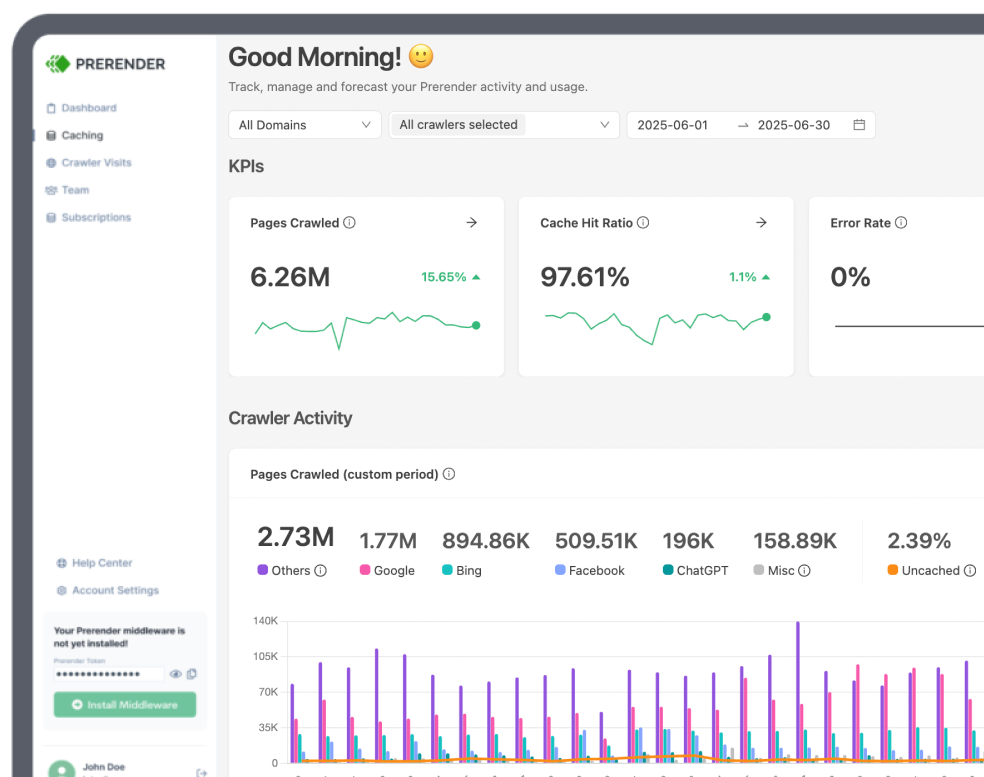
Then check that cached URLs appear in the Prerender.io dashboard and inspect important pages with Google Search Console.
Review failed renders after major routing or deployment changes. Keep the sitemap current, make sure firewalls and bot protection do not block the rendering flow, and add new AI crawler user agents when needed.
AI search visibility starts with access. If a crawler cannot retrieve the meaningful content on a React page, that content cannot be evaluated for an answer, citation, or recommendation.
Prerender.io can serve complete HTML to recognized AI crawlers and additional user agents configured by your team. They can access the same public text, links, metadata, and structured data that appear after React finishes rendering.
Prerendering improves technical access. It does not guarantee that an AI platform will index, cite, or surface the page; content quality, authority, and each platform’s systems still determine visibility.

We’ve seen a strong performance increase after implementing Prerender. This has translated into tangible revenue growth for our business.
Shopping directly in LLMs doesn’t quite exist yet, but it will soon. We’re using Prerender.io® to help us stay visible in AI search when that day comes.
Before Prerender.io, our AngularJS single-page app faced indexing issues. Prerender’s easy integration quickly led to thousands of our pages being crawled and indexed, boosting our organic traffic significantly. Their responsive support was a bonus!
I saw value almost immediately – within about a week. I could see the uptick in Google crawling activity right after implementing Prerender, and the social media previews started working properly. Those were both immediate wins that I really valued.
Enhancing the Pagespeed Insights (PSI) score for my React website was a challenge. Fortunately, I found Prerender. Their easy setup required no additional development efforts… I was elated to see my PSI score turn green!
Indexing is really fast thanks to Prerender. At this point, the indexing is on 10k pages per day. For us, that’s perfect.
We were serving Google fully rendered pages across 5700+ URLs per month in no time.
We definitely saw an uptick in search… It was literally within hours of implementation, and our team was like, ‘Oh, problems solved.’
All your React prerendering for SEO questions answered.
Your React pages may not be indexed consistently because meaningful content is often added only after JavaScript runs. To handle JavaScript, Google needs more time and processing power compared to static HTML files, which can deplete your crawl budget faster. This bottleneck creates a domino effect, causing missing content, low page speed scores, and in many cases, URLs getting ignored from the index. React complicates the rendering step, whereas Prerender.io eliminates that issue.
Prerender.io works with any React setup because it operates independently of the frontend build tool. The integration is added at the CDN, reverse proxy, hosting, or web-server layer that receives crawler requests. This supports React applications built with Vite, Create React App, webpack, React Router, and custom toolchains, provided the public URL can be loaded and rendered. Explore the available Prerender.io integrations.
You do not always need Prerender.io if you use Next.js. Routes rendered through SSR or SSG already return HTML, so a second rendering layer is optional there, although serving that HTML from cache can still get it to a crawler a few milliseconds faster. Prerender.io is worth adding when public routes remain client-rendered, depend on browser-only data loading, or return incomplete HTML to crawlers. Test the initial and rendered HTML route by route, then pick the integration option that fits — Next.js has its own middleware integration.
How quickly React SEO results change after implementation depends on when search engines recrawl and reprocess your pages. Crawler-ready HTML becomes available once the integration and cache are working, but indexing and ranking timelines remain under each search engine’s control. Verify the Prerender.io integration, then monitor Search Console for changes in crawling, index coverage, impressions, and clicks.
Prerender.io can handle React Router routes when each public route has a stable URL that can be requested directly. Add important URLs to your sitemap or caching workflow, make sure deep links return the correct status, and test several nested routes with a crawler user agent. Avoid treating hash fragments as separate indexable pages where possible.
You should not prerender every route in your React application. Focus on public URLs with search or crawler value, such as product, category, listing, article, and landing pages. Exclude authenticated dashboards, account areas, checkout flows, personalized views, and URLs that should not be indexed. This keeps the cache focused and avoids exposing user-specific content. The Prerender.io getting-started guide covers URL discovery and caching.
You can test what Googlebot receives from your React site by switching the user agent to Googlebot in Chrome DevTools and inspecting the main document response. A hosted Prerender.io response should include the x-prerender-request-id header. Confirm that the HTML contains the correct title, canonical, body content, links, structured data, and status code. Follow the complete integration-verification walkthrough, then compare the result with Search Console’s URL Inspection tool.
Prerender.io can make public React content technically accessible to recognized AI crawlers by serving them rendered HTML. Additional crawler user agents can also be added to the integration, helping bots access the text, links, metadata, and structured data without executing the React application. This does not guarantee indexing or citation by an AI platform. Learn more about AI search visibility and how to add AI crawlers to an integration.