ChatGPT Operator, Google’s Buy for Me, and procurement assistants such as SAP Joule and Coupa already evaluate products, compare vendors, and then buy products for users. This is agentic AI ecommerce: a new channel in which agents shop on behalf of buyers, deciding in milliseconds whether your store is one they can buy from.
If your site returns only a JS shell instead of usable HTML when an agentic commerce agent fetches a page, it’ll move on to a competitor that works. This is different from standard AI visibility: getting cited in an AI answer is a brand or SEO problem, but getting skipped by an AI agent is a transaction loss that won’t show up in your analytics.
This piece explains where JS ecommerce catalogs lose agentic AI transactions, why that lost revenue stays invisible in standard analytics, and how prerendering solves the rendering layer without a stack migration.
TL;DR: Why Ecommerce Sites Lose Agentic Transactions
- Agentic AI ecommerce agents cannot read JavaScript-dependent catalogs. They fetch the raw HTML and act on it immediately. If prices, variants, reviews, and other product data only appear after JavaScript runs, the agent sees an empty shell and moves on to a competitor it can read.
- These failures are largely invisible. GA4 and most monitoring tools depend on JavaScript, which the AI agent never executes. That means the visit leaves no client-side trace and may only appear in your server logs.
- The fix is server-readable HTML. Your product data must be present in the raw HTML before JavaScript runs, whether through server-side rendering, static generation, or prerendering.
- Prerender.io provides a faster path. Prerendering delivers agentic commerce readable HTML without requiring an SSR rebuild or framework migration, and can typically be set up in hours.
4 Reasons Why JavaScript Ecommerce Catalogs Fail AI Agents
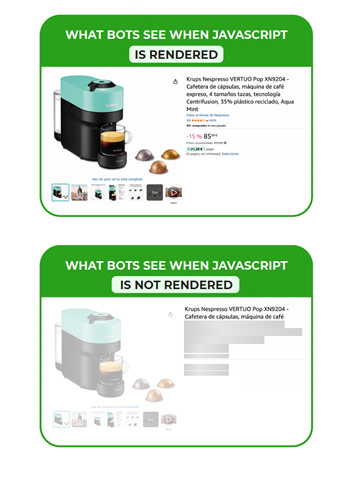
On a JS-dependent ecommerce site, the first response to an agent’s HTTP request is near-empty: a thin HTML shell of framework bootstraps, script tags, and placeholder containers. The actual product data, such as product descriptions, pricing, or variant availability, loads only after JavaScript runs in the browser, which AI agents cannot do.
Human shoppers never notice this gap because browsers execute the scripts instantly and render the full page experience. But an agent often gets no further than the initial response because it doesn’t execute JavaScript. This means the failure lies in the rendering layer, upstream of everything teams audit, not in your sitemap or content quality.
Now, this is not a quirk of one or two agents. Vercel, working with MERJ, analyzed nearly 1.3 billion AI crawler fetches and found that major non-Google AI crawlers (including GPTBot, ClaudeBot, and PerplexityBot) retrieve JavaScript files but do not execute them, leaving client-side rendered content entirely invisible. Google’s Gemini is the exception, inheriting Googlebot’s JavaScript rendering infrastructure.
Google’s Gary Illyes made the same point recently, calling out the JS rendering problem specifically for agentic RAG systems: AI agents and LLMs would have had an easier time interacting with the web if sites still relied on clean HTML and server-side rendering instead of JavaScript-heavy architectures.
From what we’ve seen testing dynamic sites, AI agent transaction failures happen most regularly in these four patterns below, each a symptom of the same rendering-layer problem:
Dynamic Pricing
If your price is populated by a useEffect, a GraphQL call, or any client-side fetch that fires after page loads, the initial HTML ships with an empty price slot. Without a visible price, the agent lacks one of the most important signals required for comparison and decision-making.
Variant-Specific Pages
Many stores create separate URLs for each product variant (color, size, model, etc.). If those variant pages also rely on client-side JS, each variant URL may serve only a generic shell. An agent crawling a variant link sees nothing and skips the item.
Filter and Faceted Navigation
When an agent builds a filtered category URL to narrow to the right subset, and that filtering lives only in JavaScript state that never reaches the server response, the agent gets the unfiltered default or an empty grid. It cannot navigate your catalog to the thing it came for.
Reviews and Ratings
Star ratings and review counts are trust signals many agents weigh alongside pricing, availability, and product specifications when comparing options. When those signals are absent from the raw HTML, they are invisible to agents evaluating your product.
| Pro tip: disable JavaScript in your Chrome DevTools > Settings, then reload your product page. If the price, variants, or reviews disappear, you can be sure that this is what agentic commerce agents also see. |
Why AI Agent Transaction Failures Are Invisible in Your SEO and AI SEO Analytics
Agent failures don’t just cost sales; they hide the evidence. A human visitor who lands on a blank page bounces or hits a 404 error you can spot in your analytics, but an AI agent that encounters an invisible JS product page leaves no such trace.
This is because GA4 and most monitoring tools run on JavaScript, and agents fetch raw HTML without executing JS, so they never trigger that tracking code. This simply means the request leaves no client-side trace, so your monitoring tools have nothing to catch or register.
The result is silence: the loss appears as a flat line where agentic commerce revenue should be, not as a visible decline. That silence is expensive now that AI-referred traffic converts 42% better than non-AI traffic, per Adobe’s March 2026 data—an 80-point swing from a year earlier, when it converted 38% worse.
Server logs are the only reliable way to detect this failure. Logs capture every raw request before scripts run, including agent hits your analytics miss. Check for GPTBot, ClaudeBot, PerplexityBot, and OAI-SearchBot on your product detail pages.
The caveat to log analysis is that agent traffic is only as visible as its user agent string. While some bots identify themselves, others mask as browsers or use proxies, so it’s best to treat your log count as a floor. The real gap is between agent requests to product URLs and agentic conversions. Every agent request with no downstream conversion means revenue going to a competitor—and from what we’ve seen, the gap is wider than most teams expect.
What AI Agents Need From a Product Page
To capture these lost sales, product pages must first meet the agent’s expectations at the rendering layer, ensuring core information is present and accessible in the raw HTML before JavaScript runs, through server-side rendering, static site generation, or prerendering with Prerender.io.
When done right, every page in your agentic AI product catalog ships its product data in the first response. The key rendering-layer requirements for AI agent-ready ecommerce sites include:
- Complete HTML, with pricing, availability, product attributes, and breadcrumbs in the initial payload rather than populated afterward.
- Schema markup that ships in the initial response instead of being injected post-JS, so an agent reading raw HTML can parse it.
- Stable URL structure, either a distinct URL per variant or a correct parent and variant relationship, so an agent can navigate to the exact size or color it was sent to buy without ambiguity.
A perfectly rendered page can still be unreachable if your access rules turn the agent away. Strict robots.txt written to block AI training crawlers can also block transactional agents, and filtered URLs that are noindexed to manage crawl budget can return an empty or redirected response by design.
However, using a llms.txt file can help distinguish the two; at minimum, confirm you aren’t disallowing AI user-agent strings such as GPTBot, ChatGPT-User, or OAI-SearchBot. We cover the full five-step failure sequence and the access-control setup in our guide to optimizing an enterprise site for agentic AI.
Why the Rendering Layer is the First Thing to Fix
Every other piece of agentic AI readiness assumes the agent can already read your page. Schema accuracy, entity signals, factual density, internal linking, and MCP integration all operate on content that must first be present in the raw HTML. When the agent receives a blank shell, those optimizations have nothing to act on.
Once your content reliably lands in the initial response, server logs should show agents successfully fetching complete product pages rather than empty HTML shells. That makes your prices, availability, variants, reviews, and product details eligible for citation, comparison, and selection, creating a measurable path from agentic AI traffic to product discovery and completed transactions.
Prerender.io: The Reliable Rendering-Layer Solution
You have a few ways to close the rendering gap: an SSR rewrite or a framework migration, but both mean re-architecting your site, pulling engineering off the roadmap for months, and absorbing the risk that comes with rebuilding a working catalog. For most teams, that cost is hard to justify against a channel they’re only beginning to measure.
Prerendering delivers the same readable HTML without requiring changes to your existing stack. For teams without the engineering runway for an SSR rewrite, Prerender.io is typically the faster, lower-cost path.
Prerender.io operates at the infrastructure layer, generating fully rendered HTML snapshots of JavaScript pages and serving them directly to agents and crawlers when they request a URL. As agentic AI ecommerce shifts more product discovery to autonomous shopping agents, this rendering solution ensures they receive your complete product data in the initial response, regardless of whether your site was built in React, Angular, Vue, or any JS framework. Human visitors still experience the normal JavaScript site.
Prerender.io’s setup takes only a few hours, integrates well with your existing JS stack, works with most CDN and backend configurations, and requires no code rewrite or ongoing maintenance burden.
How Prerender.io Closed On’s Rendering Gap and the Revenue That Followed
On’s most pressing problem was that Google could not reliably read its JavaScript-rendered product content. This led to disapproved ads across Google Shopping and DV360, and limited the visibility of its catalog in organic search.
Rather than rebuild the site with server-side rendering, On implemented Prerender.io to serve complete, readable HTML to search crawlers. This restored access to the product data Google needed to approve ads, surface listings, and index pages correctly—protecting both paid and organic acquisition channels.
Over nearly three years, On recorded a 67% increase in Google traffic and a 98% increase in Bing traffic while avoiding an SSR migration and any changes to its core site code. The company also estimates that the implementation saves millions of dollars each year.
Marilena Pixner, On’s Senior Organic Growth and SEO Specialist, said Prerender.io offered “the strongest combination of stability, speed, and value” for their site.
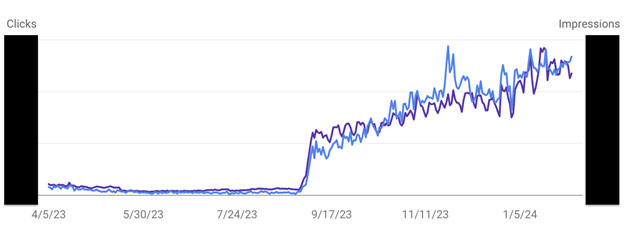
On’s image traffic results after implementing Prerender.io.
To validate the impact directly, the On team decided to run a test: they temporarily disabled Prerender.io for one month in a low-traffic market. Traffic dropped to less than 10% of its normal levels, then stabilized once it was turned back on. That single test is a clear signal that Prerender.io is a critical driver of On’s online discoverability. Read more about On’s success story with Prerender.io.
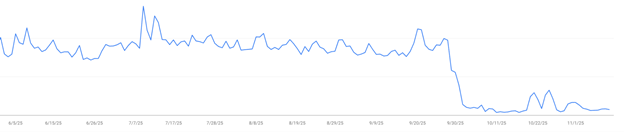
On’s image traffic after turning Prerender.io off in a controlled test
Serve AI Agents a Readable Catalog Without Rebuilding Your Frontend
The user class for ecommerce sites is expanding beyond humans, and the agent share of traffic is predicted to keep climbing. This means a growing slice of your buyers now arrive as agents, and only the sites that get readable first will be the ones agents can buy from.
To serve these transactional agents, the foundation begins at the rendering layer. With Prerender.io, you can serve agents complete, pre-rendered HTML on the first request without rebuilding your catalog, while human shoppers still enjoy the dynamic experience. That first readable response is what turns a potential AI agent transaction failure into a completed sale.
Ready to make your ecommerce catalogs visible to AI agents? Get started with Prerender.io for free and see the impact firsthand.
Frequently Asked Questions: Agentic AI Ecommerce
1. Does Fixing the Rendering Layer Affect Agentic Commerce and Other Traffic Channels?
Yes. The same rendered HTML that allows AI shopping agents to read your catalog also helps Google’s crawlers, shopping platforms, and paid media systems access your product content.
More reliable rendering can support complete indexing, reduce ad or feed disapprovals, and improve visibility across organic and paid channels. Any ranking gains are a downstream effect of making the page consistently accessible, rather than a direct result of prerendering itself.
2. How Long Does It Take to Make a JS Catalog Agent-Ready?
With prerendering, it takes a few hours. Because Prerender.io works at the infrastructure layer and serves rendered HTML to agents on request, there’s no framework migration or SSR rewrite, and it fits most existing CDN and backend setups. An SSR rebuild solves the same problem but takes months to pull off.
3. How Can Ecommerce Sites Prepare for Agentic AI?
Ecommerce sites can prepare for agentic AI by ensuring agents can reach their site at all. Once access is clear, solve the rendering layer so JS-heavy pages return complete HTML. From there, add semantic structure so agents can navigate your agentic AI product catalog, clean up your content layer for machine readability, and expose procurement workflows through APIs or MCP. Each step builds on the one before it.