JavaScript has become an integral part of developing many – if not all – enterprise websites worldwide.
JS and its frameworks allow developers, and thus businesses, create unique opportunities for users to improve their user experience, and more. However, the rapid adoption and evolution of this technology complicates the job of search engines that have to deal with a whole new challenge: Rendering.
We’ve talked before about how Google crawls and renders JavaScript pages, so we won’t go into further details here. But it’s essential to keep in mind that for Google to be able to index your content, it first has to render the page to access its content. Although Google and other search engines are constantly innovating, there’s still much work to do before they can handle JavaScript to the fullest extent.
The Ongoing Battle Between Google and JavaScript
Search engine crawlers work similarly:
- They find a link
- Download all necessary files to render the page
- Find all links on the page and follow those too
This process is what allows search engines to discover new pages and build associations between them.
(Note: from now on, we’ll be talking about Google, but other search engines use the same or a similar technique for rendering pages. In fact, in 2019, Bing announced they were restructuring BingBot to use the same technology as Google.) However, JavaScript adds an additional layer of complexity to things.
To render a JS page, GoogleBot must download all JavaScript files and send all files (HTML, CSS, etc.) to the “Renderer.” Then, the “Renderer,” using an instance of Google Chrome and Puppeteer, will execute the JavaScript and return the static HTML for indexing. So problem solved, right? Nope, not quite yet.
There are two things to consider:
First, the crawl budget. Google has limited resources, so they need to distribute them as efficiently as possible, and having to perform an extra heavy process takes away resources from this budget.
Second, the volume of pages Google crawls and renders every second. Spending one or two extra seconds per page doesn’t sound as much, but multiply that by millions, and you have a problem. However, the time gap between JS and HTML content is significant. The technical SEO agency Onely ran an experiment to measure how long it takes for Google to crawl JS content compared to HTML content.
Here’s the experiment’s premise:
“I wanted to check how long it would take Google to crawl a set of pages with JavaScript content vs. regular HTML pages. If Google could only access a given page by following a JavaScript-injected internal link, then I could measure how long it took for Google to reach that page by looking at our server logs.”
To summarize, they created a subdomain with two folders in it. Each folder contained seven pages, but one had only HTML content, and the other injected similar (but different!) content through JavaScript. Finally, they pinged Google about the first page on each folder (the other six pages being only accessible through a link in the content) and waited. It took Google 36 hours for Google to reach page seven on the HTML folder. For the JS folder, it took 313 hours to reach page seven, or about nine times longer.
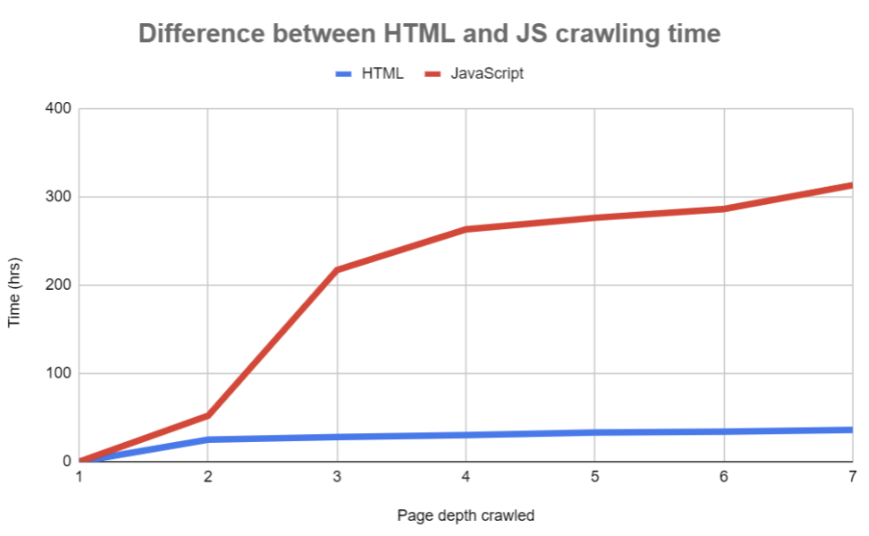
Source: Onely
Now imagine this in a 100k to 1M pages website. Rendering issues are bound to happen, and as your Render Ratio starts to fall, so does the quality of your site (in Google’s eyes) and your organic traffic.
What is Render Ratio?
In short, your website’s render ratio is the percentage of content that has been rendered by Google, calculated by dividing the total pages shown in Google search results containing a “rendered phrase” and the total number of pages displayed in the SERP containing an “HTML phrase.”
As you can imagine, this is a highly manual process that requires you to:
- Look for an element (in the series of pages you want to check) that’s only available once JavaScript is injected into the page (render phrase).
- Look for an element (in the same set of pages) that’s always available in the HTML portion of the page (HTML phrase).
- Perform an advanced search on google: site:yourdomain.com “HTML phrase”
- Do the same, but with the render phrase: site:yourdomain.com “render phrase”
- Divide the number of results for the render phrase by the number of results for the HTML phrase
- Multiply the result by 100, and you have your render ratio
The higher the render ratio, the more content Google has been able to render.
Why is Render Ratio Important?
There are many SEO issues related to JavaScript that will hurt your site if left unchecked, and keeping an eye on your render ratio can be a great way to identify where to start your efforts.
Unrendered content is the same as not having that content for search engines. Yes, users can access and enjoy the content, but if search engines can’t, they won’t consider these URLs for ranking purposes.
In fact, this missing content can do the contrary.
As Google crawls your pages and fails to render the content, the end result is a clearly unfinished or broken page that can be tagged as thin or duplicate content – if the other pages in the series use the same HTML elements. This is also an easy way to waste your crawl budget. As the Googlebot finds these pages without relevant content, you’re wasting your resources on pages that’ll do more harm than good. Moreover, Google can deprioritize your website as a trustworthy source if the issue is severe enough.
Lastly, you must remember that Google will only follow links it can find. If your JavaScript-inserted links are not getting rendered, then Google won’t be able to find deeper or related pages through internal links, damaging your site’s crawlability and indexability.
Fixing Render Ratio Issues with Prerender.io
Although most companies assume there’s no way to hit a 100% render ratio without sacrificing their JavaScript elements or implementing an expensive server-side rendering system, eliminating rendering issues is quite easy with the right approach. To fix your render ratio, all you need to do is install Prerender’s middleware on your website. Once installed, it’ll be able to recognize when the user agent is a bot and serve your dynamic page as a fully-rendered static HTML file to search engines. Here’s how it works.
Google won’t need to send your page to the “Renderer” – nor use crawl budget on fetching JS files or waiting for new links to render – all content will be accessible, and JS-injected links will be ready for crawlers to follow instantly. To make Prerender even more cost-efficient, you can pre-render dynamic and publicly available pages. In other words, only the pages you want Google to find and rank.
After the first request from a bot, all your pages will be cached, increasing your “server” response time and allowing your site to get better PageSpeed scores, have a 100% render ratio, and get your pages indexed faster.
Curious to learn more? Watch the video below for commonly-asked questions about Prerender.io from businesses like yours, or create a free account to get started.