You completed a website migration. Redirects are working, canonicals were preserved, the sitemap was submitted, and Googlebot is crawling your new URLs. Yet weeks later, rankings remain down, and your traffic data doesn’t clearly explain why.
A broken redirect map or an overlooked migration task doesn’t always cause that gap. Instead, it often traces to what crawlers receive after requesting your new URLs while critical content still depends on JavaScript to become available. A site migration can pass all standard checks while silently introducing a rendering dependency that restricts what crawlers can access.
Working from infrastructure logs covering billions of monthly render requests, our team sees three recurring rendering-related failure patterns in SEO site migrations. Here’s how to identify these failure modes in your data, diagnose what your standard migration checks missed, and keep your SEO performance at its peak even during complex site migrations.
TL;DR: Why Site Migration Causes SEO Ranking Drops
- Standard migration checklists confirm important SEO signals moved correctly, but they don’t always confirm crawlers can access the full pages those signals point to.
- Crawl budget and rendering resources come under pressure together at cutover. A large migration forces search engines to process many new or changed URLs while revisiting old URLs and following redirects.
- Ranking losses tend to concentrate on templates with the thinnest initial HTML, usually product and category pages, which total traffic reports can hide.
- AI crawlers, including GPTBot, ClaudeBot, and PerplexityBot, never execute JavaScript, so they receive the initial HTML response, leaving content and SEO signals unavailable if they are injected after the page loads.
- A rendering layer such as Prerender.io can serve complete HTML to crawlers, reducing their need to execute your site’s JavaScript during and after a migration.
Why Standard Site Migration Checklists Miss the Real Risk
Standard SEO migration checklists confirm that critical signals have moved correctly—by verifying redirect chains, canonical tags, XML sitemaps, and Search Console verification. However, they miss a critical diagnostic question: when a crawler requests one of your new URLs, what payload does it actually receive?
A successful HTTP response code doesn’t mean every important part of the page was available in the initial HTML. Server-rendered pages deliver content and SEO signals instantly, whereas JS-heavy sites require script execution before critical elements appear. Because crawling, rendering, and indexing are separate pipeline stages, rendering costs search engines significant time and resources—and many crawlers cannot execute JavaScript at all. During a website migration, this bottleneck worsens as search engines simultaneously reprocess thousands of changed URLs, follow redirects, and discover new paths.
This is why crawl monitoring alone can give false confidence. Crawl statistics show that bots are requesting your pages, but not whether the expected HTML was available, JavaScript executed successfully, or the resulting page contained the SEO signals you intended to migrate. When standard checks pass, yet traffic drops, your priority should be investigating the rendering layer to identify clear signs your site has JavaScript rendering problems.
3 Reasons Your Site Migration Can Cause SEO Ranking Drops
Once you look beyond crawl activity alone, running a targeted JavaScript rendering audit can reveal technical bottlenecks that standard migration checks miss. The three failure modes below do not explain every migration-related ranking drop. But they matter most for JavaScript-heavy sites because they sit beneath otherwise successful redirects, canonical mappings, and crawl reports.
1. Crawl Budget and Rendering Resources Get Stretched at the Same Time
Most migration guides discuss crawl budget management for large websites, since a major migration creates a massive URL-processing workload. For JavaScript-heavy sites, however, crawling is only half the cost.
Search engines like Google discover and fetch a page first, then render it if the important content isn’t in the initial HTML. Those are separate stages drawing on separate resources, and a migration strains both at once.
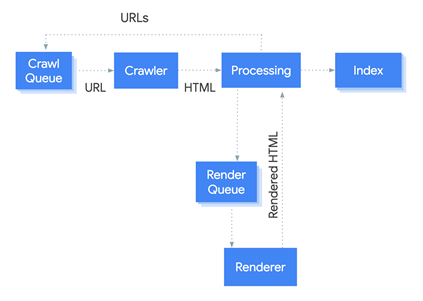
While well-implemented redirects carry historical signals forward, a migration still pushes thousands of URLs back through Google’s processing pipeline. When your server latency spikes or redirect chains consume initial crawl allocation, Google’s Web Rendering Service suffers the downstream bottleneck.
Because executing client-side JavaScript requires roughly 9x more processing power than parsing static HTML (according to Onely’s research), any delay at the crawl stage forces Google to defer the rendering stage, queuing your JS-injected content indefinitely.
That cost gap is why two teams can run equally careful migrations and see completely different recovery curves. In our infrastructure logs, the visible result is pages sitting at “Discovered – currently not indexed” for weeks after publication.
How to Diagnose Crawl and Render Bottlenecks
- Step 1: Check GSC Indexation Baselines
Open Page Indexing in Google Search Console and inspect the “Discovered – currently not indexed” report. A post-cutover spike that fails to drain indicates Google has queued your JS pages due to rendering budget constraints.
- Step 2: Measure Server Latency & Bot Volume
Extract four weeks of pre- and post-cutover Googlebot server logs. A sudden drop in daily request volume signals a server-level bottleneck. Check your TTFB (Time to First Byte) immediately.
- Step 3: Calculate Your Redirect Allocation Ratio
Divide total 3xx responses by total bot requests. If 3xx responses exceed 20%, more than a fifth of your crawl budget is being consumed by redirect hops instead of live, renderable content.
2. Ranking Loss Concentrates on JavaScript-Heavy Page Types
When rankings fall after a site migration, most teams open a total organic traffic chart. It confirms the decline but doesn’t show where the problem is concentrated because migration losses are never evenly spread.
The loss clusters on templates with the thinnest initial HTML. For example, product pages that load important details after an API request, category pages that generate listings client-side, or any template that depends on JavaScript for its main content. Meanwhile, server-rendered pages in the same migration often recover faster, which is how teams reach the comfortable and wrong conclusion that the migration mostly worked.
Two other signals go missing for the same underlying reason. Internal links rendered via a client-side router never appear in the raw HTML, so equity from the old site stops flowing to the pages that relied on it. Canonical tags injected by JS are also absent, leaving the duplicate URL variants your migration created with nothing to consolidate them.
How to Diagnose Rendering Dependencies by Page Type
- Step 1: Segment Performance Data by Template Path
Filter your Page Indexing and Performance reports in Google Search Console by URL pattern (e.g., /product/ vs. /category/ vs. /blog/) and compare the traffic decline across each group. Look specifically for URL classes spiking in “Discovered — currently not indexed,” as this indicates Google found the URLs but has deferred its rendering resources.
- Step 2: Inspect Raw HTML vs. Rendered DOM
Take a representative URL from each template and test it in GSC’s URL Inspection Tool. Compare the initial HTML response against the rendered view to audit critical SEO signals:
| Template | Content in raw HTML? | Internal links present? | Canonical present? | Indexing status |
|---|---|---|---|---|
| /product/ | ||||
| /category/ | ||||
| /blog/ |
- Step 3: Evaluate Rendering Dependencies
Any template where critical elements appear only after rendering has a confirmed rendering dependency. While a rendering dependency doesn’t automatically prove the root cause of every loss, it uncovers a critical blind spot no redirect map or sitemap audit will expose. For instance, Eldorado increased organic traffic by 80% simply by fixing SPA rendering bottlenecks that restricted search engines from accessing core content.
To learn more about how client-side execution affects your search visibility, read our complete guide on why JavaScript complicates indexing performance.
3. AI Crawlers Have No Rendering Fallback, and Migration Resets Their Crawl History Too
While Google eventually renders and reindexes your JavaScript pages, AI crawlers give you nothing equivalent.
Vercel and MERJ analyzed hundreds of millions of crawler fetches and found no evidence that any major AI crawler executes JavaScript. GPTBot fetched JavaScript files in about 11.5% of requests without executing them, while ClaudeBot downloaded them in about 23.84% of requests and never ran them. PerplexityBot, Bytespider, and Meta’s crawler behave the same way. Only Google Gemini differs, since it leverages Googlebot’s Web Rendering Service.
This is why a site migration raises the stakes. Googlebot queues your new URLs and eventually reaches them, whereas an AI crawler that requests a new URL and receives an empty shell simply records it and moves on. Nothing holds the page for another attempt, so your content stops surfacing in AI-generated answers, and no rank tracking tool will show you it happened.
Structured data further widens that gap. AI systems rely on schema markup to understand a page and cite it confidently, so product, FAQ, and organization schema injected through a tag manager or a JavaScript component stays invisible to every non-rendering crawler until rendering is fixed.
How to Diagnose AI Crawler Visibility and Schema Gaps
- Step 1: Inspect the Raw Source Code
Open View Source (Ctrl+U / Cmd+Option+U) on your live URL to view the unrendered server response.
- Step 2: Run a String Search for Core Elements
Search the raw source response for three critical identifiers:
- Your main page heading
- A distinctive line of primary body copy
- Your JSON-LD structured data block
- Step 3: Audit Template Exposure
Execute this check across the same templates evaluated in your GSC audit. Anything missing from the raw source code is completely invisible to AI crawlers today, with no deferred rendering queue to fix it tomorrow.
To learn more about how search engines and LLM crawlers process your site differently, read our detailed breakdown on understanding web crawlers: traditional vs. AI bots.
How to Protect SEO Rankings During a Site Migration
Once you’ve identified a rendering dependency, the fix isn’t to rebuild your SEO migration plan. It’s to add a layer that gives crawlers a complete representation of your new pages immediately, without requiring each one to do the rendering work itself.
5 Consequence Risks: What Happens to Rankings Without a Rendering Layer
- Indexing takes longer. Google Search Console reports blank or thin pages at new URLs while the rendering queue works through your inventory.
- Redirects fail silently for bots. Client-side and JavaScript-driven redirects fire in a browser and never execute for a crawler that does not run JavaScript.
- Pre-migration link equity goes to waste. Bots cannot render the new URLs to confirm the destination exists, so the authority pointed at your old pages has nowhere to land.
- Ranking losses becomes harder to diagnose. Aggregate traffic data shows a decline without revealing that one JavaScript-heavy template accounts for most of it.
- International SEO signals become harder to validate. Crawlers that never execute JavaScript can’t confirm hreflang annotations generated through JavaScript.
How Prerender.io Protects Your Site Before, During, and After Migration
Prerender.io provides a rendering layer for JavaScript sites. It intercepts crawler requests at your CDN or server, renders the page in a headless browser, caches the resulting HTML, and serves that version to the crawler.
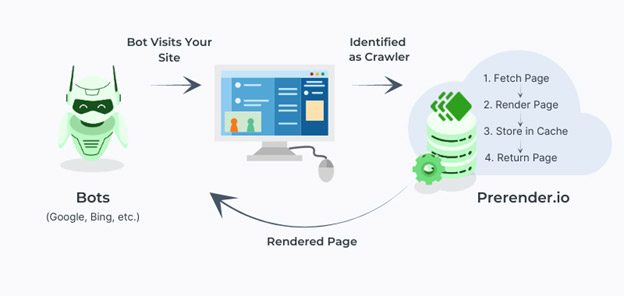
Across a migration timeline, this infrastructure layer operates in three distinct phases:
A. Before Migration (Pre-Cutover Indexing)
- Phased and incremental migrations often run old and new stacks in parallel.
- Prerender serves fully rendered pages from the new stack to search engines before full cutover.
- Bots index the new URLs while construction is finishing, ensuring cutover happens against URLs that already have an established index history.
B. During Migration (Crawl Budget and Signal Preservation)
- Prerender complements correct 301 redirects and URL mapping.
- Once a crawler reaches a JS-heavy destination URL, Prerender serves static HTML directly rather than forcing client-side execution.
- Crawl budget is preserved because crawlers aren’t wasting allocation on unrenderable URLs or multi-hop redirect chains.
C. After Migration (Cache Hygiene and Signal Validation)
- Prerender serves cached rendered pages instantly on subsequent crawls, preventing GSC from registering blank pages.
- Critical Cache Hygiene Step: Clear stale snapshots keyed to pre-migration URLs by clearing cache by URL pattern, submitting your new XML sitemap, and using the Recache API to prioritize revenue-critical pages.
- JS-dependent elements—including body content, internal links, schema markup, and hreflang tags—become permanently visible to all supported crawlers.
Protecting Your Site Migration SEO Beyond the Standard Checklist
A website migration can fail for many reasons, but when redirects, canonical tags, and other standard checks don’t explain a lasting ranking drop, your rendering setup is the next place to look. Site migration SEO stops where a crawler requests your new URL, and the rendering layer determines what happens next.
If important content and SEO signals depend on JavaScript, serving crawlers complete rendered HTML through Prerender.io removes a major blind spot that no migration checklist covers.
Try Prerender.io for free and see how prerendering protects your site’s visibility before, during, and after a migration.
FAQs on Site Migration
1. How long does it take to recover SEO rankings after a site migration?
Recovering SEO rankings after a site migration typically takes a few weeks for small to medium-sized sites, while enterprise-level migrations can take several months. According to Google, recovery timelines depend on URL volume and server processing speed. For JavaScript-heavy applications, rendering capacity becomes a critical third variable: a URL that has been crawled remains unindexed until search engines complete the rendering phase.
2. Why do SEO rankings drop after a site migration even when redirects are correct?
SEO rankings can drop after a site migration with correct 301 redirects because a proper redirect only transfers URL signals. It does not guarantee the destination page is free of technical or rendering issues. On JS sites, ranking drops frequently trace back to rendering failures in which critical content, links, or canonical tags fail to appear in the initial HTML shell. Comparing the raw crawled HTML against the rendered view in Search Console’s URL Inspection tool will confirm if rendering dependencies are responsible.
3. How do you check whether JavaScript rendering is affecting SEO after a migration?
You can check if JavaScript rendering is affecting your post-migration SEO by segmenting your affected URLs by page template rather than looking at aggregate traffic charts. Inspect representative URLs from each template using GSC’s URL Inspection Tool and compare the raw HTML response against the rendered view. If critical elements like body copy, internal links, canonical tags, or schema markup appear only after JavaScript executes, you have confirmed a rendering dependency that requires a dedicated rendering solution