If your Google Ads keep getting disapproved, you’re probably familiar with messages like “destination not working” and “Low Quality Score.“
Most teams treat these as marketing or policy issues. They rewrite copy, tweak layouts, compress images, or resubmit ads, only to get their Google Ads disapproved again. But in many cases, the issue isn’t your messaging.
Google Ads reviews landing pages using a crawler that doesn’t reliably execute JavaScript. If your main content isn’t visible at the moment it fetches the page, Google Ads may flag it as broken, even if it works perfectly for users.
On smaller sites, this might affect a single landing page. On larger JavaScript-heavy sites (such as marketplaces with thousands of product pages), the same issue can affect many URLs simultaneously, across multiple campaigns or languages.
Let’s dive deeper into how to solve disapproved Google Ads and why JavaScript rendering is often the root cause behind repeated ad rejections.
Why Google Ads Disapproves JS Websites
Google Ads doesn’t evaluate landing pages the way humans or even Google Search’s crawler, GoogleBot, does. When you submit an ad, Google Ads uses its own crawler (called AdsBot) to fetch and inspect your landing page.
At a high level, Google Ads checks:
- Accessibility: can the page be reliably fetched?
- Visibility: is the main content immediately visible?
- Usability: does the page appear stable, fast, and functional?
- Relevance: does the page match what the ad promises?
If any of these checks fail, your Google Ad could be disapproved or restricted, and you may see an error message like this one:
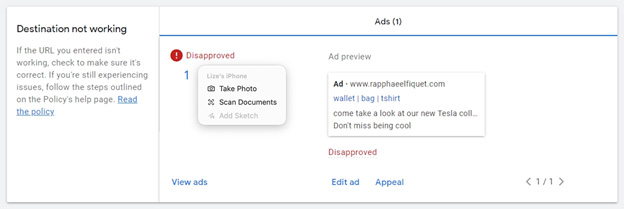
This is not a judgment of your offer, copy, or design; it is a technical reliability check.
The Rendering Timing Problem on JavaScript Sites
JavaScript-heavy sites often don’t show meaningful content at the exact moment Google Ads fetches the page.
These websites, built with JavaScript frameworks like React, Vue, and Angular, Next.js, or newer “vibe-coded” platforms like Lovable, often rely on client-side rendering. Instead of returning a complete page from the server, they ship a minimal HTML shell and rely on JavaScript to assemble the real content in the browser.
This setup is especially common on modern fashion retailers, marketplaces, and travel sites, where pages are generated dynamically based on products, availability, pricing, location, or language. Instead of a handful of static landing pages, these enterprise-scale sites often operate thousands of URLs that change frequently.
To users, this usually isn’t noticeable. Their browser runs the scripts, loads the data, and renders the page as expected.
Google Ads, however, doesn’t experience your site the way a user does. Its crawlers don’t scroll, wait for long-running JavaScript execution, or interact with your site. They evaluate only what’s immediately available when the page is fetched.
When Google Ads reviews a large catalogue, multi-language, or campaign-driven site, it fetches many different URLs independently and often at unpredictable times. If the main content isn’t visible at that point, Google Ads may interpret the page as thin, broken, or unreliable, even if it looks perfect a few seconds later in a real browser.
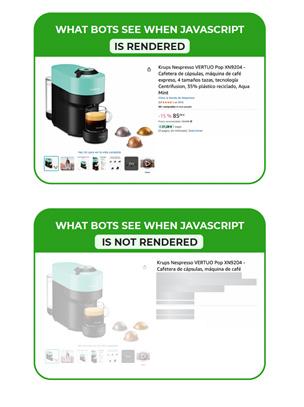
That visibility gap by Google Ads crawlers on JS content is one of the most common reasons JavaScript-heavy websites have their Google Ads disapproved.
From Rendering Errors to Google Ads Quality Score Penalties
So, you might be wondering: how does Google Ads review landing pages?
When Google Ads can’t consistently fetch or interpret your landing page, that failure feeds into how your page is classified and scored across Google Ads systems. Rendering issues don’t live in isolation; they influence how trustworthy, usable, and reliable your landing page appears to Google’s automated reviewers.
On JavaScript-heavy sites with thousands of pages, like ecommerce, this inconsistency often doesn’t affect just one URL. The same rendering gap can surface across dozens or hundreds of campaign URLs, making ad approvals unpredictable and hard to troubleshoot.
This is where landing page experience and Quality Score come into play.
How Landing Page Experience and Quality Score Work Together for Google Ads
Google Ads doesn’t just check whether your page loads. It evaluates your landing page as part of a broader quality assessment that determines whether your ads are allowed to run, how often they appear, and how much you pay per click.
The assessment is indicated by the Quality Score, which is determined by three components:
- Expected CTR: how likely users are to click.
- Ad relevance: how closely your ad matches the query.
- Landing page experience: what happens after the click.
Most teams focus on improving copy, keywords, and targeting to raise CTR and relevance. But ad disapprovals and delivery issues usually stem from the third component: landing page experience.
Landing page experience isn’t a judgment of how persuasive your page is. It’s an evaluation of whether Google’s systems believe the page is:
- Accessible and fetchable.
- Fast enough to load reliably.
- Stable and usable.
- Honest and technically trustworthy.
When the landing page experience drops, the Quality Score drops with it. That can lead to higher CPCs, reduced delivery, and, in more severe cases, disapproved Google Ads.
Where Performance, Speed, and Stability Signals Come In
Google Ads doesn’t publish an exact checklist of all the signals it uses for ad landing page optimization. However, it does care about many of the same fundamentals that Google Search measures through performance and usability metrics.
In technical SEO, these are commonly expressed as Core Web Vitals:
- LCP (Largest Contentful Paint): how quickly the main content appears.
- CLS (Cumulative Layout Shift): how stable the layout is.
- INP (Interaction to Next Paint): how responsive the page feels.
While Google Ads doesn’t officially confirm that it uses Core Web Vitals for Google Ads in the same way Google Search does, it clearly evaluates similar signals: ad landing page speed, visual stability, and usability at load time.
This is where JavaScript rendering for Google Ads often becomes the breaking point.
Related: What Are Core Web Vitals and How to Improve Them
How JavaScript Rendering Issues Show Up in Google Ads
When something goes wrong during evaluation, Google Ads doesn’t call it a JavaScript rendering issue. Instead, it surfaces as a small set of vague, recurring errors inside the Ads interface.
Below are the most common ones and what they typically indicate.
1. “Destination not Working” or “Destination not Crawlable”
This doesn’t always mean your site is down. It often means Google Ads’ crawlers can’t reliably fetch or interpret your landing page.
Common triggers include:
- Empty or near-empty initial HTML.
- Core content loading only after JavaScript executes.
- Blocked or delayed JS, CSS, or API requests.
- Slow hydration.
- Bot traffic blocked by WAF or security rules.
2. “Poor Landing Page Experience”
This is one of the most misunderstood warnings. It’s not just about design or conversion rate. It’s about whether Google Ads’ crawlers can clearly understand what the page is and what it offers.
It often appears when:
- Main content isn’t visible at fetch time.
- Headings or key details are missing.
- Page structure or metadata is incomplete.
- Important content loads too late.
3. “Low Quality Score”
Low Quality Score is often blamed on weak copy or poor UX, but landing page experience is one of its core components. And if Google Ads’ crawlers struggle to interpret your page consistently, that evaluation can suffer. Slow responses, unstable layouts, or missing content at load can all degrade Quality Score, regardless of how strong your copy or targeting is.
How to Fix Google Ads Disapprovals Caused by JavaScript
Once you recognize the pattern, the fix becomes clearer. You don’t need another round of copy tweaks, creative tests, or bid changes. You need Google Ads to consistently access the same content your users see.
Two Ways to Fix Rendering Issues That Break Google Ads
| Approach | How it works | Pros | Cons | Best for |
|---|---|---|---|---|
| Server-Side Rendering (SSR) | The server sends fully rendered HTML for every request. |
|
| Teams that are rebuilding their frontend anyway and are willing to invest heavily in architecture. |
| Prerendering with Prerender.io | Google Ads crawlers receive fully rendered HTML snapshots, while users keep the dynamic JavaScript experience. |
|
|
|
Read: Explaining the Difference Between Prerendering and Other Rendering Options
How On Fixed Google Ads Disapprovals by Rendering Their JS Website with Prerender.io
On, the global performance footwear and apparel brand ran into this exact issue during a major frontend migration. To users, everything looked fine: pages loaded, products displayed, and the experience felt modern and fast.
But the new frontend wasn’t consistently readable to web crawlers. And that created a cascading set of failures across their acquisition and visibility channels:
- Repeated disapprovals across Google Shopping, display, and video ads.
- Inconsistent ad approvals across product and category pages.
- Indexing issues on key product pages.
- Broken social previews.
- Crawlers failing to process core content.
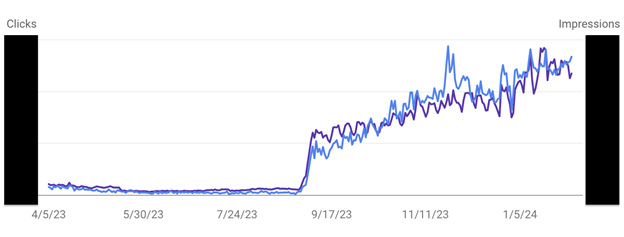
As the team put it, they weren’t just protecting traffic. They were protecting their entire digital marketing system. Once On integrated Prerender.io, their landing pages became reliably readable at evaluation time and within days:
“Prerender.io directly solved our ad disapproval issues.”
Beyond resolving disapprovals, Prerender.io also improved On’s Google Image visibility, ensuring that bots could consistently access and process images across Google Search and Google Shopping Ads.
Read the full case study: How On, a Multi-Billion-Dollar Athletics Brand, Saved Millions
Are your Google Ads getting repeatedly disapproved? Talk to our team to see how Prerender.io fixes JavaScript rendering issues that block ad approvals.
Fix Google Ads Disapprovals Without Rebuilding Your Frontend
The issue On faced wasn’t unique, and neither was the fix.
Prerender.io helps Google Ads reliably evaluate your real landing page content at the moment it matters, without changing your frontend stack or user experience. Instead of rebuilding for server-side rendering, teams use Prerender.io to:
- Make landing pages readable at evaluation time.
- Eliminate “destination not working” and “poor landing page experience” errors.
- Stabilize Quality Score and ad delivery.
- Fix visibility issues across ads, search, and social previews.
It’s a fast, low-risk way to resolve Google Ads disapprovals caused by JavaScript and to prevent them from coming back.
Give Prerender.io a try today to fix your Google Ads disapprovals for good.
FAQs: Google Ads Disapprovals and JavaScript Rendering
1. Why Does Google Ads Disapprove JavaScript Websites?
Google Ads disapproves JavaScript websites when its systems can’t reliably evaluate the landing page at fetch time. If core content isn’t visible immediately, Google Ads may treat the page as unreliable even if it works fine for users. This is a core part of why Google Ads disapproves JS websites, and it’s the same technical visibility gap that Prerender.io exists to solve in search, crawling, and AI contexts.
2. How Does Prerender.io Fix Disapproved Google Ads?
Prerender.io fixes disapproved Google Ads by providing ad platform crawlers with fully rendered HTML content from JavaScript-heavy sites. When Google Ads reviews landing pages, JavaScript-generated content often appears blank to crawlers because it hasn’t loaded yet, leading to disapprovals. Prerender.io serves pre-rendered HTML to these crawlers so they can properly evaluate the content.
3. How Does Google Ads Review Landing Pages Differently Than Google Search?
Google Ads crawlers prioritize immediate accessibility and usability at fetch time, whereas Google Search crawlers are more patient and iterative. That said, if your landing pages are built with JavaScript, they are likely invisible to both crawlers. Consequently, your Google Ads get disapproved, and your landing pages won’t show up on Google search.
4. What Does “Google Ads Destination Not Working” Mean?
“Destination not working” usually means Google Ads can’t reliably fetch or interpret your landing page during evaluation. On JavaScript-heavy sites, this happens when the server response lacks complete HTML or when dynamic content loads too late. Rendering the page with Prerender.io, for instance, can solve this issue.
5. Does Prerender.io Also Help with AI Search and AI Crawlers?
Yes, the same rendering issues that affect Google Ads also affect AI-powered crawlers used by tools like ChatGPT, Perplexity, and other AI search systems. Prerender.io ensures that AI crawlers receive fully rendered, machine-readable HTML, making your content easier to process for both paid acquisition systems and AI-driven discovery.