The launch of ChatGPT Atlas signals a shift in how JavaScript-heavy websites are discovered, interpreted, and interacted with by AI. Unlike traditional browsers, the OpenAI Atlas browser is designed for AI-powered browsing—navigating pages, executing JavaScript, and extracting context directly from the DOM. For sites built with React, Vue, or Next.js, this means JS content rendering, accessibility, and structured content now play a direct role in how AI understands your product and surfaces it to users.
In this article, we explore what ChatGPT Atlas for JavaScript websites actually means in practice. We’ll break down how Atlas “sees” dynamic content, why pre-rendering JavaScript content matters more than ever, and what you should prioritize today to ensure your JavaScript sites are readable, navigable, and usable for the Atlas ChatGPT web browser.
TL;DR: Impacts of ChatGPT Atlas on Your JavaScript Websites and SEO Strategies
ChatGPT Atlas is OpenAI’s new AI-powered browser that can explore and interact with JavaScript websites instead of just loading them. For marketers, this changes how content gets discovered, understood, and surfaced by AI tools.
What this means in practice:
- AI assistants now read your website’s structure, not just your copy, to understand what your product or content is about
- JavaScript-heavy sites can accidentally hide important content from AI if pages rely too much on client-side loading
- Making your site accessible and well-structured helps AI accurately interpret your pages and recommend them to users
- Pre-rendering JavaScript, like using Prerender.io, ensures AI sees the same content a human would, without changing your tech stack
- Structured data gives AI a clearer context, improving summaries, answers, and visibility in AI-powered browsing experiences
In short, how your website is built now directly affects how AI tools like ChatGPT Atlas find, understand, and present your brand. If the AI-based browser can’t clearly read your site, it can’t recommend it.
What is OpenAI Atlas Browser?
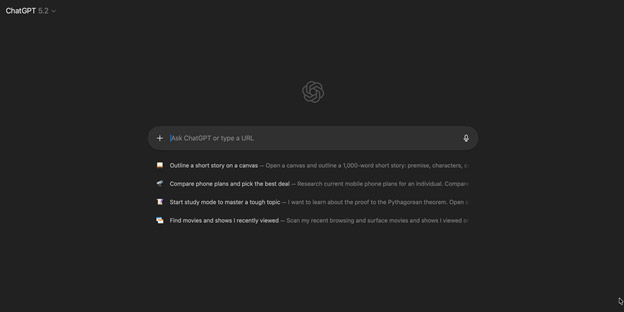
The OpenAI Atlas browser (also referred to as ChatGPT Atlas) is a Chromium-based browser, but it behaves differently from Google Chrome. While it runs on the same underlying engine—meaning it can load modern HTML, CSS, and execute JavaScript just like Chrome—Atlas focuses on AI-powered browsing.
Where Chrome is a passive tool controlled entirely by a user, Atlas adds an intelligent layer on top of the browser engine. This includes ChatGPT Atlas rendering pages, navigating them, interacting with the DOM, clicking buttons, filling forms, and extracting meaning from dynamic content to complete tasks—actions that traditional browsers can’t do.
In agent mode, Atlas can open tabs, follow links, analyze page structure, and automate multi-step workflows without direct human input.
How the OpenAI Atlas Browser “Sees” Your JavaScript Websites
Unlike traditional browsers that render JavaScript and move on, Atlas continuously interprets what appears on the page. For instance, it maintains context for on-screen content through a built-in sidebar, removing the friction of copying and pasting information into ChatGPT.
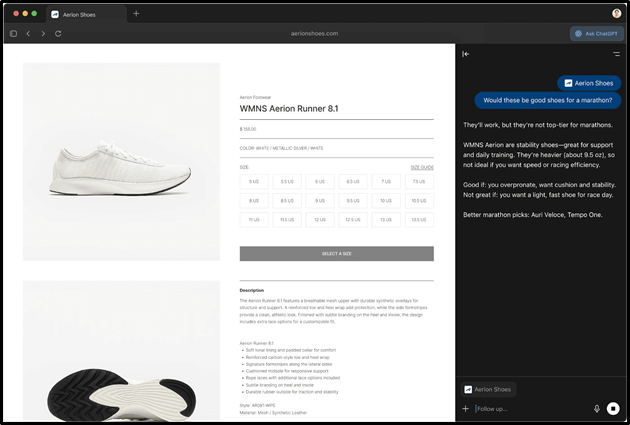
This continuous operation means three key things happen with your JavaScript:
- Your DOM structure undergoes constant interpretation for semantic meaning
- Dynamic state changes get monitored and incorporated into the AI’s understanding
- User interactions with your JavaScript UI become queryable through natural language
If you have a React, Vue, or Angular app, Atlas executes the JavaScript, builds the DOM, and displays the content. However, the assistant’s understanding is based on the structured DOM and data, not the visual layout. Atlas parses the HTML structure, text content, and metadata of your site, then feeds that information into ChatGPT’s reasoning. In practice, Atlas fetches your page, runs client-side code, and interprets the resulting DOM to extract meaning.
| How Atlas processes JavaScript content in plain English: Unlike a normal browser that loads a page and stops there, ChatGPT Atlas keeps “watching” what’s happening on your site. As content changes, loads, or responds to user actions, Atlas tracks those updates and uses them to understand what the page is about. It doesn’t rely on how your site looks visually—instead, it reads the underlying page structure, text, and metadata after your JavaScript runs. In simple terms, Atlas turns your JavaScript website into something it can ask questions about, reason over, and interact with as a human would. |
How Does Atlas Impact JavaScript Websites?
Because Atlas actively interprets and interacts with JavaScript websites, your site is no longer read only by humans—it’s also being interpreted and acted on by an AI assistant.
This shifts what matters most. DOM accessibility, predictable React rendering, and well-structured, pre-rendered JavaScript content become essential if you want Atlas to understand your site and successfully surface it to users.
The Dynamic Content Indexing Challenge Posed By Atlas
All behind-the-scenes details of your front-end code influence what the AI “sees.” If your single-page app only injects meaningful text into the DOM after certain user interactions or after a long delay, the Atlas might initially see a bare page.
Similarly, if key content only becomes available after a user logs in or clicks a button, the AI might miss it unless guided. Early tests have found that dynamic content loading mechanisms like infinite scroll and client-rendered updates can lead to inconsistent results for Atlas’s agent.
| Key takeaway: Your content must be present and accessible in the DOM when ChatGPT tries to interact with the page, or it becomes invisible to AI-powered browsing |
How ChatGPT Atlas Understands JavaScript Website Structure and UI
DOM Accessibility as the Foundation for AI Understanding
The accessibility tree has always been important for users with disabilities. In the OpenAI Atlas browser, DOM accessibility now dictates your content’s discoverability.
ChatGPT Atlas for JavaScript websites functions like a superpowered screen reader, parsing the DOM to determine page structure and elements. OpenAI explicitly states that “making your website more accessible helps ChatGPT Agent in Atlas understand it better.”
Atlas uses ARIA tags and roles (the same ones used by assistive technologies) to interpret page structure and interactive elements. This sends a strong signal to developers and website owners. If you want the AI agent to grasp your page’s layout and actions, you must follow accessibility best practices.
The Accessibility Tree as Atlas’s Primary Navigation Layer
Every modern browser constructs an accessibility tree alongside the DOM. This tree provides a semantic representation of your page, exposing roles, states, properties, and relationships between elements.
While human users interact with the visual rendering of your JavaScript application, AI agents in Atlas primarily navigate it via the accessibility tree, similar to how screen readers interpret web content.
Consider what this means practically. When a user asks Atlas to “add the blue running shoes to my cart,” the AI doesn’t perform optical character recognition on your rendered page.
Instead, it queries the accessibility tree for specific elements:
- Elements with a role of “button” or “link”
- Accessible names containing “cart” or “add”
- Parent containers identified as product cards
- Associated text describing “blue running shoes”
If your React application consists primarily of semantically meaningless <div> elements with click handlers, the accessibility tree becomes sparse and ambiguous. The AI agent must guess which divs represent buttons, which represent navigation, and which are layout containers.
This guesswork leads to unreliable automation and a limited understanding of your website by the OpenAI Atlas browser.
The solution remains straightforward: use semantic HTML elements whenever possible. Choose <button> when creating clickable buttons, <ul> should be used for lists, <article> for content sections, and <form> for forms.
If a custom element is needed, add appropriate role attributes. Ensure every interactive element has an accessible name or label.
Structured Data and Context: Speaking Atlas ChatGPT AI’s Language
When it comes to AI-powered tools like ChatGPT Atlas, structured data becomes vital for explaining what your content means. Structured data describes your content in machine-readable formats, most commonly using Schema.org vocabulary within <script type="application/ld+json"> tags.
Originally developed for search engines, structured data now explicitly defines content meaning to AI browsers. While Schema.org offers dozens of vocabulary types, certain formats prove especially relevant for AI comprehension.
Essential Schema Types for AI-Powered Browsing
Here are some typical schema markups you should add to your web pages to make them more AI-friendly for Atlas. Get some tips on how to implement schema markups correctly here.
- FAQPage: Ideal for help centers, product FAQs, or support pages. Even if answers hide behind toggles, this markup ensures discoverability.
- Article: Use for blog posts, news, or editorial content. This schema provides AI with metadata that supports accurate summarization and citation.
- Product: Essential for e-commerce pages. Product schema describes pricing, availability, ratings, and structured descriptions.
- Organization/Person: Helps AI connect your content to broader identity context. The schema explains who’s behind the content and what brand it represents.
- HowTo: For step-by-step tutorials or processes. This schema clearly lays out each instruction, requirement, and expected result.
Incorporating these schema types into your site helps AI assistants summarize pages more accurately. It also increases your chances of being surfaced in AI-powered browsing.
Pre-Rendering with Prerender.io Ensures Atlas Sees Your JS Content
To ensure that AI (and users) can access your full content and context, proper rendering strategies become essential. While server-side rendering (SSR) has traditionally been one approach, a more flexible solution for many teams is prerendering JavaScript using Prerender.io.
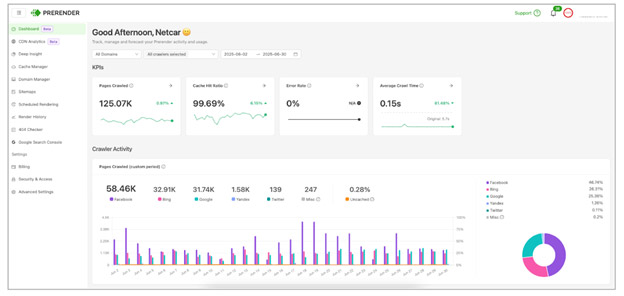
Unlike SSR, which requires changes to your site’s architecture or framework (like migrating to Next.js or Nuxt), Prerender.io acts as a middleware layer. The service automatically intercepts crawler requests (including those from AI agents and search bots) and delivers fully rendered, static HTML snapshots of your page.
Related: see how Prerender.io compares with in-house SSR.
Your React, Vue, or Angular code stays the same. Prerender.io handles the heavy lifting of executing your JavaScript and caching the result. This approach means that the OpenAI Atlas browser and all AI agents receive the same content a human user would see after full rendering, without waiting for scripts to execute.
For organizations with existing client-side rendered apps or sites with complex build pipelines, Prerender.io offers a zero-refactor way to become AI-friendly instantly. The service works alongside any front-end stack and can be deployed in minutes.
You can configure it to serve prerendered pages only to bots while delivering dynamic content to users, giving you the best of both worlds.
Why JavaScript Pre-Rendering Matters for Atlas
Pre-rendering generates static HTML snapshots of your JavaScript application, ensuring content becomes immediately available without requiring JavaScript execution.
For Atlas, pre-rendering provides three key benefits:
- Faster AI Response Times: When users ask questions about your page, AI can parse pre-rendered HTML instantly rather than waiting for JavaScript execution.
- Reliability: If a website relies heavily on JavaScript to load its main navigation menu, a search engine crawler might not access the links within that menu. Pre-rendering eliminates this risk entirely.
- Bandwidth Efficiency: AI agents accessing your site don’t need to download and execute hundreds of kilobytes of JavaScript. They receive pre-rendered HTML optimized for machine consumption.
Testing Your Visibility for ChatGPT Atlas
Want to test how visible your content is to AI? Disable JavaScript in your browser and reload your site. If you’re staring at a blank shell or a loading spinner, that’s exactly what an AI assistant might see.
With Prerender.io in place, you guarantee that what matters most stays front and center for bots, assistants, and users alike.
How to Prepare Your JavaScript Site for ChatGPT Atlas Discoverability
How can developers of React, Vue, Angular, or Next.js sites adapt to this new AI-driven web? The best practices for Atlas align with existing best practices, but with greater emphasis on their importance.
Here’s your checklist to ensure your JavaScript-heavy site is Atlas-friendly:
1. Render Primary Content on the Server (or Use a Pre-rendering Tool)
Start with the foundation: make sure your content is actually visible when the page loads. Don’t make the AI (or users) wait for essential content to appear.
Utilize server-side rendering or static site generation for your pages whenever possible, especially for content that doesn’t require client-side computation. Frameworks like Next.js, Remix, or SvelteKit make SSR easier for React and Vue apps.
If your stack can’t easily do SSR, a pre-rendering service becomes your best solution. Prerender.io is the industry-leading platform for this purpose, designed specifically to make JavaScript-heavy sites indexable by search engines and AI browsers alike.
Prerender.io generates static HTML snapshots of your pages and serves them to crawlers and AI, so they see a fully-formed page with all your content intact.
The key involves exposing your core content in the initial HTML response. If content hides behind JS hydration, Atlas may miss it. By delivering a mostly complete DOM upfront, you ensure that Atlas indexes your content correctly and any AI-powered browsing agent can get the full context without extra clicks.
Learn more about how Prerender.io works by watching this video.
2. Use Semantic HTML and Clear Structure
Once your content renders properly, make sure it’s structured logically. Avoid a “DIV soup” of unlabeled containers.
Instead, use proper semantic elements: maintain an <h1>–<h2> hierarchy for headings, and use <nav>, <main>, <section>, and <article> tags where appropriate.
This structure allows Atlas to discern the outline of your page. A logical DOM structure helps the AI (and any assistive technology) understand which content is most important and how different pieces relate to each other.
3. Ensure Accessibility (ARIA Labels, Alt Text, etc.)
Good structure means nothing if elements aren’t labeled properly. Make sure every interactive element has an accessible name or label.
If you have a button that opens a menu, the button’s text (or ARIA-label) should clearly say what it does, like “Open Categories Menu.” Forms should have labels, images need descriptive alt attributes, and interactive widgets should be keyboard-accessible.
These practices mean that Atlas’s assistant can “see” what each element is and even operate it if needed. Design with inclusive access in mind. This approach benefits human users and AI agents alike.
4. Provide Structured Data and Metadata
Help Atlas understand your content by adding context through structured data. Include relevant schema.org markup (in JSON-LD or microdata format) for your content.
If you run an e-commerce site, use Product schema. If it’s a blog, use Article schema and FAQ schema for common questions.
Well-structured metadata helps Atlas by improving summarization quality and giving the AI factual anchor points about your page. Don’t neglect basic meta tags either. Title tags, meta descriptions, and OpenGraph tags all add context that the AI might draw on in its summary or when deciding what content to quote.
5. Optimize Performance and Stability
Keep your site lean and efficient. Minify your JS/CSS, use hydration strategies that won’t block the page for too long, and avoid long spinner screens or multiple redirects.
A fast site means Atlas can load and analyze it quickly, which may improve how much of your content gets captured in a summary or agent run.
Avoid sudden DOM rewrites or content shifts that could confuse an automated agent. Using stable IDs and predictable layouts helps ensure that even if the AI refreshes or revisits, it finds the same structure each time.
Test your site with assistive technologies or automated scripts to see if an AI agent can reliably complete key tasks (like login flows or adding an item to cart) without hiccups.
Final Thoughts on ChatGPT Atlas for JavaScript Websites
By following these steps, developers ensure that both people and AI assistants can get the most out of their websites. You’re making your site machine-readable, crawlable, structured, accessible, and performant: the five hallmarks of being “Atlas-ready.”
This alignment closely follows long-standing SEO and accessibility guidelines. Now the payoff extends beyond better search rankings or user experience to include better representation in AI-driven tools.
The OpenAI Atlas browser represents just the beginning of AI-powered browsing. Preparing your JavaScript websites for Atlas means preparing for the future of web interaction, where AI agents become primary consumers of your content alongside human users.
Get started with Prerender.io now to ensure your site is ready for Atlas and all other AI browsers.